Managing the OS update channel on Wi-Fi System extenders
In KeeneticOS version 4.2.3, the ability to manage the update channel for extenders via the Wi-Fi System controller has been added.
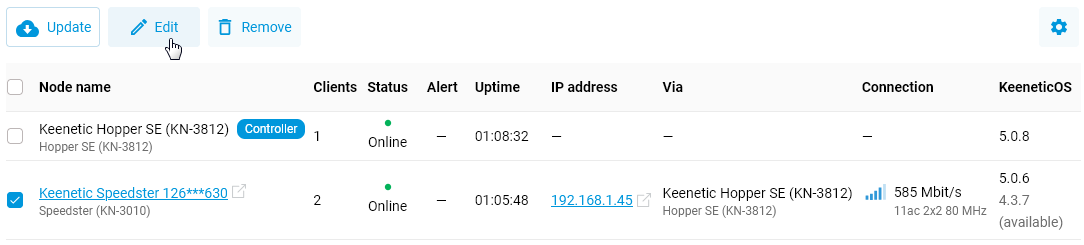
In the controller’s web interface, go to the Mesh Wi-Fi System page and select (tick) the extender for which you want to change the update channel. An Edit button will appear; click it.
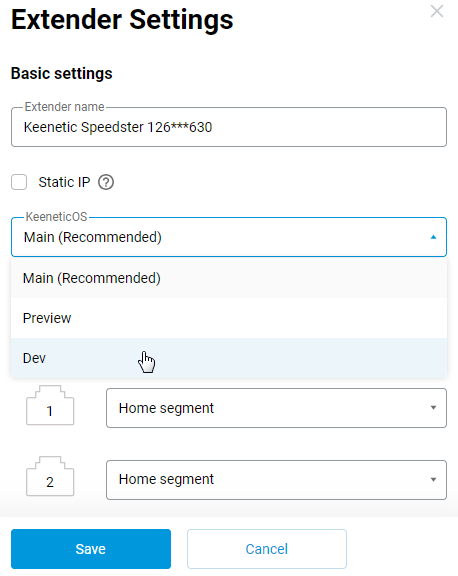
In the Extender Settings window, in the KeeneticOS field, select the required update channel.
Click the Save button.
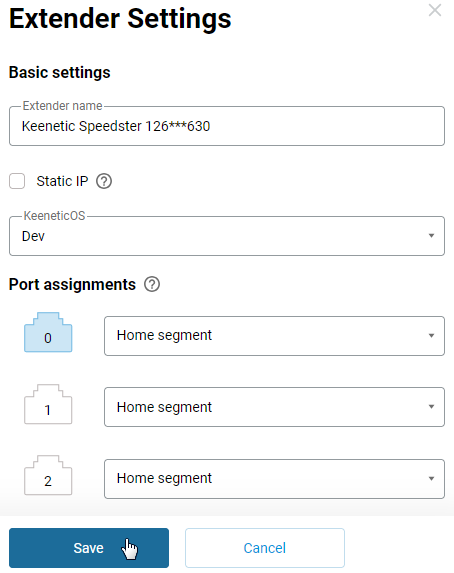
Once configured in this way, the extender will use the selected update channel (which may differ from the controller’s update channel).

Caution
To achieve the best performance from your Mesh Wi-Fi System, it is recommended that you use the same OS version on all network nodes. Optimal performance may not be achieved if the nodes are running different software versions. However, different OS versions may be installed on the Wi-Fi System nodes; the key is that the difference between the versions should be minimal.
Please exercise caution when installing updates from the Developer Channel. Debug versions from this channel may be unstable and potentially may contain flaws that could lead to a Wi-Fi System crash or malfunction. Do not install updates from the Developer Channel on Wi-Fi System nodes unless necessary (exceptions may be made only for legacy models).