Installazione di OPKG Entware nella memoria interna del router
A partire dalla versione KeeneticOS 3.7, per alcuni dei modelli Keenetic, è possibile scrivere OPKG Entware nella partizione UBIFS della memoria flash NAND del router, cioè nella memoria integrata del router.
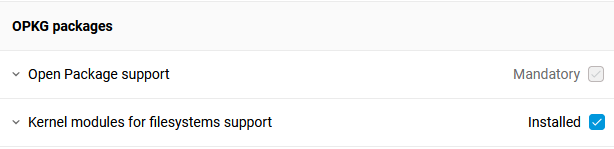
Per supportare questa funzione, è necessario installare i seguenti componenti:
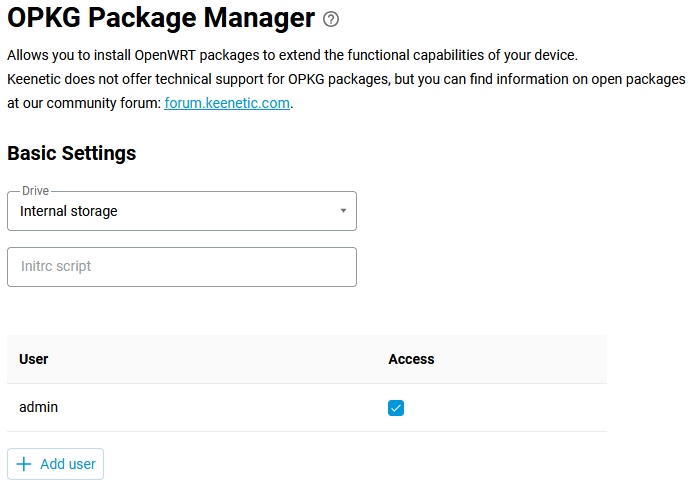
In the router's web interface, go to the OPKG Package Manager page and in the Drive field, select the Internal storage option. Make sure that the Access option is enabled for the user account that allows access to OPKG services. Click Save.
Esiste un comando CLI per l'installazione online di OPKG Entware (scaricando l'archivio e installandolo) sulla memoria flash integrata del router. Se, per qualche motivo, non funziona, seguire le istruzioni di installazione manuale riportate di seguito.
opkg disk storage:/ https://bin.entware.net/aarch64-k3.10/installer/aarch64-installer.tar.gz
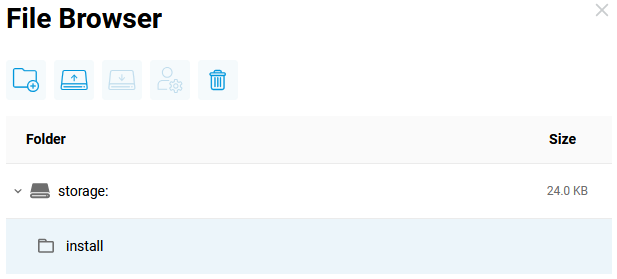
Nella pagina Applicazioni (Applications) in Dispositivi USB (USB Devices), fare clic su Archiviazione interna (Internal storage) e quindi, sulla partizione di archiviazione integrata, creare la cartella install:
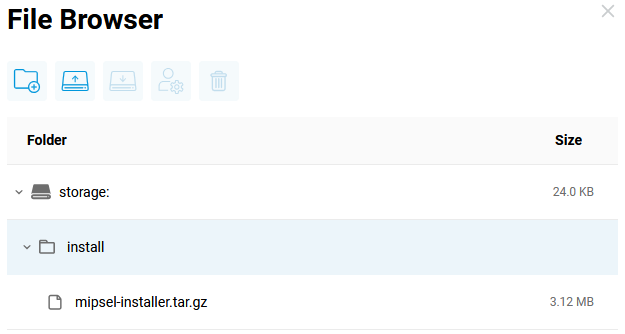
In questa cartella è necessario caricare un file di archivio speciale, a seconda del dispositivo:
Nota
Per il modello Titan (KN-1811), utilizza l'archivio aarch64 — EN_aarch64-installer.tar.gz
Nel nostro esempio, considereremo l'installazione dell'archivio mipsel.
Nell'interfaccia della riga di comando (CLI) del router, selezionare la partizione di sistema storage:/ per installare OPKG Entware:
(config)> opkg disk storage:/
Opkg::Manager: Disk is set to: storage:/.
oppure
(config)> opkg disk storage:
Opkg::Manager: Disk is set to: storage:.
Nel registro verranno visualizzate le seguenti voci:
Dec 7 10:49:42 ndm
Core::FileSystem::Repository: "storage:/install" created.
Dec 7 10:51:23 ndm
Opkg::Manager: disk is set to: storage:/.
Dec 7 10:51:23 ndm
Opkg::Manager: /storage mounted to /storage.
Dec 7 10:51:23 ndm
Opkg::Manager: /storage mounted to /opt/.
Dec 7 10:51:23 npkg
inflating "mipsel-installer.tar.gz".
Dec 7 10:51:29 ndm
Opkg::Manager: /storage initialized.
Dec 7 10:51:29 ndm
Opkg::Manager: invalid initrc "/opt/etc/initrc": no such file or directory, trying /opt/etc/init.d/.
Dec 7 10:51:29 ndm
Opkg::Manager: /opt/etc/init.d/doinstall: [1/5] Starting "Entware" deployment...
Dec 7 10:51:29 ndm
Opkg::Manager: /opt/etc/init.d/doinstall: UBIFS partition is not tested.
Dec 7 10:51:29 ndm
Opkg::Manager: /opt/etc/init.d/doinstall: Please, use ext2/ext3/ext4 if something goes wrong.
Dec 7 10:51:29 ndm
Opkg::Manager: /opt/etc/init.d/doinstall: Info: "ping google.com"...
Dec 7 10:51:31 ndm
Opkg::Manager: /opt/etc/init.d/doinstall: Info: "ping google.com" ..... OK.
Dec 7 10:51:32 ndm
Opkg::Manager: /opt/etc/init.d/doinstall: Info: "ping bin.entware.net"...
Dec 7 10:51:34 ndm
Opkg::Manager: /opt/etc/init.d/doinstall: Info: "ping bin.entware.net" ..... OK.
Dec 7 10:51:35 ndm
Opkg::Manager: /opt/etc/init.d/doinstall: [2/5] Basic packages installation...
Dec 7 10:51:35 ndm
Opkg::Manager: /opt/etc/init.d/doinstall: Info: Installing "libgcc" package...
Dec 7 10:51:36 ndm
Opkg::Manager: /opt/etc/init.d/doinstall: Info: The "libgcc" package has been installed.
Dec 7 10:51:37 ndm
Opkg::Manager: /opt/etc/init.d/doinstall: Info: Installing "libc" package...
Dec 7 10:51:41 ndm
Opkg::Manager: /opt/etc/init.d/doinstall: Info: The "libc" package has been installed.
Dec 7 10:51:42 ndm
Opkg::Manager: /opt/etc/init.d/doinstall: Info: Installing "libpthread" package...
Dec 7 10:51:43 ndm
Opkg::Manager: /opt/etc/init.d/doinstall: Info: The "libpthread" package has been installed.
Dec 7 10:51:44 ndm
Opkg::Manager: /opt/etc/init.d/doinstall: Info: Installing "librt" package...
Dec 7 10:51:45 ndm
Opkg::Manager: /opt/etc/init.d/doinstall: Info: The "librt" package has been installed.
Dec 7 10:51:46 ndm
Opkg::Manager: /opt/etc/init.d/doinstall: Info: Installing "entware-release" package...
Dec 7 10:51:48 ndm
Opkg::Manager: /opt/etc/init.d/doinstall: Info: The "entware-release" package has been installed.
Dec 7 10:51:49 ndm
Opkg::Manager: /opt/etc/init.d/doinstall: Info: Installing "findutils" package...
Dec 7 10:51:50 ndm
Opkg::Manager: /opt/etc/init.d/doinstall: Info: The "findutils" package has been installed.
Dec 7 10:51:51 ndm
Opkg::Manager: /opt/etc/init.d/doinstall: Info: Installing "grep" package...
Dec 7 10:51:53 ndm
Opkg::Manager: /opt/etc/init.d/doinstall: Info: The "grep" package has been installed.
Dec 7 10:51:54 ndm
Opkg::Manager: /opt/etc/init.d/doinstall: Info: Installing "ldconfig" package...
Dec 7 10:51:56 ndm
Opkg::Manager: /opt/etc/init.d/doinstall: Info: The "ldconfig" package has been installed.
Dec 7 10:51:57 ndm
Opkg::Manager: /opt/etc/init.d/doinstall: Info: Installing "locales" package...
Dec 7 10:52:00 ndm
Opkg::Manager: /opt/etc/init.d/doinstall: Info: The "locales" package has been installed.
Dec 7 10:52:01 ndm
Opkg::Manager: /opt/etc/init.d/doinstall: Info: Installing "opkg" package...
Dec 7 10:52:03 ndm
Opkg::Manager: /opt/etc/init.d/doinstall: Info: The "opkg" package has been installed.
Dec 7 10:52:04 ndm
Opkg::Manager: /opt/etc/init.d/doinstall: Info: Installing "zoneinfo-asia" package...
Dec 7 10:52:05 ndm
Opkg::Manager: /opt/etc/init.d/doinstall: Info: The "zoneinfo-asia" package has been installed.
Dec 7 10:52:06 ndm
Opkg::Manager: /opt/etc/init.d/doinstall: Info: Installing "zoneinfo-europe" package...
Dec 7 10:52:07 ndm
Opkg::Manager: /opt/etc/init.d/doinstall: Info: The "zoneinfo-europe" package has been installed.
Dec 7 10:52:08 ndm
Opkg::Manager: /opt/etc/init.d/doinstall: Info: Installing "opt-ndmv2" package...
Dec 7 10:52:11 ndm
Opkg::Manager: /opt/etc/init.d/doinstall: Info: The "opt-ndmv2" package has been installed.
Dec 7 10:52:12 ndm
Opkg::Manager: /opt/etc/init.d/doinstall: Info: Installing "dropbear" package...
Dec 7 10:52:13 ndm
Opkg::Manager: /opt/etc/init.d/doinstall: Info: The "dropbear" package has been installed.
Dec 7 10:52:14 ndm
Opkg::Manager: /opt/etc/init.d/doinstall: Info: Installing "poorbox" package...
Dec 7 10:52:16 ndm
Opkg::Manager: /opt/etc/init.d/doinstall: Info: The "poorbox" package has been installed.
Dec 7 10:52:17 ndm
Opkg::Manager: /opt/etc/init.d/doinstall: Info: Installing "busybox" package...
Dec 7 10:52:23 ndm
Opkg::Manager: /opt/etc/init.d/doinstall: Info: The "busybox" package has been installed.
Dec 7 10:52:24 ndm
Opkg::Manager: /opt/etc/init.d/doinstall: Info: All basic packages were installed...
Dec 7 10:52:24 ndm
Opkg::Manager: /opt/etc/init.d/doinstall: [3/5] Generating SSH keys...
Dec 7 10:52:24 ndm
Opkg::Manager: /opt/etc/init.d/doinstall: Info: Generating "rsa" key...
Dec 7 10:52:28 ndm
Opkg::Manager: /opt/etc/init.d/doinstall: Info: "rsa" key was created.
Dec 7 10:52:29 ndm
Opkg::Manager: /opt/etc/init.d/doinstall: Info: Generating "ecdsa" key...
Dec 7 10:52:29 ndm
Opkg::Manager: /opt/etc/init.d/doinstall: Info: "ecdsa" key was created.
Dec 7 10:52:30 ndm
Opkg::Manager: /opt/etc/init.d/doinstall: Info: Generating "ed25519" key...
Dec 7 10:52:31 ndm
Opkg::Manager: /opt/etc/init.d/doinstall: Info: "ed25519" key was created.
Dec 7 10:52:32 ndm
Opkg::Manager: /opt/etc/init.d/doinstall: [4/5] Setting timezone, script initrc and starting "dropbear"...
Dec 7 10:52:32 dropbear[4223]
Running in background
Dec 7 10:52:32 ndm
Opkg::Manager: configured init script: "/opt/etc/init.d/rc.unslung".
Dec 7 10:52:32 ndm
Core::System::Configuration: saving (http/rci).
Dec 7 10:52:32 ndm
Opkg::Manager: /opt/etc/init.d/doinstall: Log on to start an SSH session using login - root, password - keenetic.
Dec 7 10:52:32 ndm
Opkg::Manager: /opt/etc/init.d/doinstall: [5/5] "Entware" installed!
Dec 7 10:52:35 ndm
Core::System::Configuration: configuration saved.
Verifica dell'accesso dalla CLI:
(config)> exec sh

BusyBox v1.33.0 () built-in shell (ash)
/ #
Modificare la password per l'utente root (per impostazione predefinita, login root, password keenetic):
/ # passwd root
Changing password for root
New password:
Bad password: too weak
Retype password:
passwd: password for root changed by root
La password è stata modificata, iniziamo l'aggiornamento dell'elenco dei pacchetti e di OPKG:
/ #opkg updateDownloading http://bin.entware.net/mipselsf-k3.4/Packages.gz Updated list of available packages in /opt/var/opkg-lists/entware Downloading http://bin.entware.net/mipselsf-k3.4/keenetic/Packages.gz Updated list of available packages in /opt/var/opkg-lists/keendev / #opkg upgrade
Ora installare il pacchetto OPKG richiesto.
Per disinstallare Entware OPKG, andare all'interfaccia della riga di comando (CLI) del router e disabilitare l'avvio di OPKG:
(config)> no opkg disk
Opkg::Manager: Disk is unset.
Quindi smontare la partizione di sistema storage::
(config)> no system mount storage:
Core::FileSystem::Repository: "storage:" unmounted.
Eliminare il contenuto della partizione di sistema storage::
(config)> erase storage:
Core::FileSystem::Repository: "storage:" erased.
Nota
In caso di problemi con il montaggio della partizione o l'implementazione del sistema, è possibile chiedere aiuto sul nostro forum Keenetic Community.