VRRP support
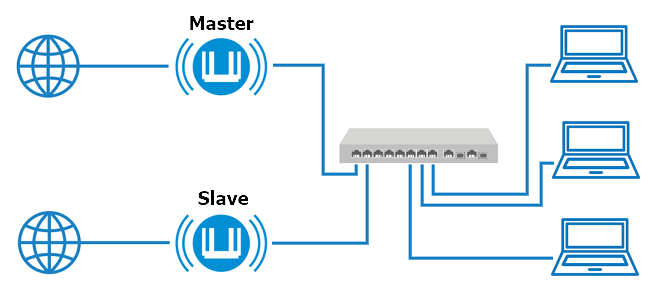
Starting with OS version 5.0, support for Virtual Router Redundancy Protocol (VRRP) versions v2 and v3 has been added for backup routers. VRRP provides automatic failover between master and slave routers, ensuring stable, reliable connections. In other words, VRRP support ensures fault-tolerant routing between multiple routers. The backup router will automatically assume the master role in the event of a physical failure of the master router, a cable break between the master router and the switch, or a failure of the switch port to which the master router is connected.
You can use two or more routers (typically two). VRRP is compatible with other vendors and open-source implementations. The routers must be connected to different physical WAN links and power sources. The routers emulate a virtual IP address for the LAN network. One router acts as the master, and the other as the slave. When the master router fails (or becomes unavailable), the slave automatically takes over as the master router. When the master router comes back online, the transition reverses from slave to master.
To use this feature, you must install the VRRP support system component. You can do this in the router’s web interface on the System Settings page, under the KeeneticOS & Updates tab, by clicking Component options.

VRRP configuration is implemented via the router’s command-line interface (CLI). The following commands are used:
interface {name} vrrp group {group} ip {ip}— set a virtual IP address for the group;interface {name} vrrp group {group} priority {priority}— set the priority (an integer in the range from 0 to 255); the device with the highest numerical priority becomes the master in the group;interface {name} vrrp group {group} advertise {advertise}— set the advertisement interval in seconds (an integer in the range from 1 to 255; the default value is 1);interface {name} vrrp version {version}— specify the protocol version;show interface {name} vrrp— display the VRRP status.
Important
For detailed information on working with the router’s command-line interface, a complete description of all commands, and their syntax, refer to the command-line interface manual. You can find it on our website in the Download Center section by selecting your device model.
Here is an example of configuring VRRP on Keenetic routers. A group with a shared virtual IP address is configured on both routers. This same address is specified in the DHCP server options as the default gateway. The addresses of the Bridge0 interfaces are in the same subnet. The static IP addresses on the Bridge0 interface of the routers must be different.
Master:
interface Bridge0 vrrp group 1 ip 192.168.1.100
interface Bridge0 vrrp group 1 priority 100
interface Bridge0 vrrp group 1 advertise 3
system configuration save
Slave:
interface Bridge0 vrrp group 1 ip 192.168.1.100
interface Bridge0 vrrp group 1 priority 50
interface Bridge0 vrrp group 1 advertise 3
system configuration save
To check, try turning off the master router or disconnecting the patch cord that connects the master router to the switch.
Note
To improve the reliability and stability of your Internet connection, we recommend configuring Internet access through multiple providers on each router (at least on the master router). If the primary Internet connection on the master router stops working, the router will automatically switch to the backup connection.