Connessione a una VPN WireGuard da Linux
A partire da KeeneticOS 3.3, è possibile utilizzare un tunnel VPN WireGuard per connettersi da remoto alla rete locale del router Keenetic.
Importante
Se si prevede di configurare il proprio Keenetic come server VPN, assicurarsi che disponga di un indirizzo IP pubblico e, se si utilizza KeenDNS, che funzioni in modalità Accesso diretto, che richiede anche un indirizzo IP pubblico. Se una di queste condizioni non è soddisfatta, non sarà possibile connettersi a tale server da Internet.
Innanzitutto, è necessario configurare il server WireGuard sul dispositivo Keenetic. Le seguenti istruzioni mostrano il processo: Configurazione di una VPN WireGuard tra due router Keenetic. Quindi, passare alla configurazione del client VPN.
Ecco un esempio di come connettersi al server VPN da un sistema operativo Linux, utilizzando la CLI (terminale) per impostare la connessione in Ubuntu 18.04 LTS e l'interfaccia grafica nella distribuzione Linux Mint 19.3 LTS.
Per stabilire una connessione a un server WireGuard Keenetic su un computer basato su Linux, è necessario installare il pacchetto WireGuard utilizzando il gestore di pacchetti apt integrato.
Una variante di installazione e configurazione utilizzando il terminale
Avviare il terminale e installare i pacchetti necessari per il funzionamento di WireGuard nel terminale e configurare la connessione nella GUI di NetworkManager (un programma per la gestione delle connessioni di rete): pacchetto dell'applicazione, modulo del kernel, file di intestazione del kernel.
[my@my-wrk-lnv ~]$
sudo apt install wireguardReading package lists... Done Building dependency tree... Done Reading state information... Done The following additional packages will be installed: wireguard-tools Suggested packages: openresolv | resolvconf The following NEW packages will be installed: wireguard wireguard-tools 0 upgraded, 2 newly installed, 0 to remove and 0 not upgraded. Need to get 90,0 kB of archives. After this operation, 344 kB of additional disk space will be used. Do you want to continue? [Y/n] y Get:1 http://mirrors.daticum.com/ubuntu impish/universe amd64 wireguard-tools amd64 1.0.20210424-1ubuntu1 [86,9 kB] Get:2 http://mirrors.daticum.com/ubuntu impish/universe amd64 wireguard all 1.0.20210424-1ubuntu1 [3 126 B] Fetched 90,0 kB in 0s (1 181 kB/s) Selecting previously unselected package wireguard-tools. (Reading database ... 234329 files and directories currently installed.) Preparing to unpack .../wireguard-tools_1.0.20210424-1ubuntu1_amd64.deb ... Unpacking wireguard-tools (1.0.20210424-1ubuntu1) ... Selecting previously unselected package wireguard. Preparing to unpack .../wireguard_1.0.20210424-1ubuntu1_all.deb ... Unpacking wireguard (1.0.20210424-1ubuntu1) ... Setting up wireguard-tools (1.0.20210424-1ubuntu1) ... wg-quick.target is a disabled or a static unit not running, not starting it. Setting up wireguard (1.0.20210424-1ubuntu1) ... Processing triggers for man-db (2.9.4-2) ...Creare una chiave privata e una chiave pubblica:
[my@my-wrk-lnv ~]$
cd /etc/wireguard/[my@my-wrk-lnv wireguard]$umask 077[my@my-wrk-lnv wireguard]$sudo -i[sudo] password for my: root@my-wrk-lnv:~#cd /etc/wireguard/root@my-wrk-lnv:/etc/wireguard#wg genkey > private-keyroot@my-wrk-lnv:/etc/wireguard#wg pubkey > public-key < private-keyroot@my-wrk-lnv:~#exit[my@my-wrk-lnv wireguard]$sudo cat private-keyAOSXWm+sXxRuu/Uo8lysE4PIwVZTRDD+YV6w3HicGHg= [my@my-wrk-lnv wireguard]$sudo cat public-keyxxKBcZlhZlbjW7yFuhZ08l294HBAp2I/iM05YE8vs0Y= [my@my-wrk-lnv wireguard]$cd -[my@my-wrk-lnv ~]$Importante
Se si ottiene il risultato
Permission denieddopo aver digitatocd /etc/wireguard/, non si dispone dell'accesso root per leggere la directory.[my@my-wrk-lnv ~]$
cd /etc/wireguard/bash: cd: /etc/wireguard/:Permission deniedModificare il proprietario per consentire l'accesso alla directory senza diritti di root:
[my@my-wrk-lnv ~]$
sudo chown -R my /etc/wireguard/[my@my-wrk-lnv ~]$cd /etc/wireguard[my@my-wrk-lnvwireguard]$Dopo aver configurato la connessione, è possibile ripristinare il proprietario per l'accesso predefinito alla directory:
[my@my-wrk-lnv wireguard]$
cd - /home/my[my@my-wrk-lnv ~]$sudo chown -R root /etc/wireguard/Creare il file di configurazione
wg-client.conf:[my@my-wrk-lnv wireguard]$
sudo touch wg-client.conf[my@my-wrk-lnv wireguard]$ls -1private-key public-keywg-client.confAggiungere le impostazioni di connessione al file di configurazione
wg-client.confcreato, aprendo il file con un editor di testo, ad esempio, nano:[my@my-wrk-lnv wireguard]$
sudo nano wg-client.conf[sudo] password for my: [Interface] PrivateKey = AOSXWm+sXxRuu/Uo8lysE4PIwVZTRDD+YV6w3HicGHg= Address = 172.16.82.5/24 DNS = [Peer] PublicKey = 1YVx+x3C817V9YdhUtpUhzyDLVj5tnK2m//WjFGynm4= AllowedIPs = 172.16.82.1/32, 192.168.22.0/24 Endpoint = wgwrkserver.dynns.com:16631 PersistentKeepalive = 5Configurazione dell'[Interfaccia] del client:
Nel campo PrivateKey dell'interfaccia client, inserire la chiave privata creata nel passaggio 2.
La chiave può essere visualizzata con il comando
cat:[my@my-wrk-lnv wireguard]$
sudo cat private-keyAOSXWm+sXxRuu/Uo8lysE4PIwVZTRDD+YV6w3HicGHg=Nel campo 'Addresses' dell'interfaccia client, specificare l'indirizzo IP in formato IP/bitmask —
172.16.82.5/24(questo è l'indirizzo interno del tunnel). È possibile utilizzare un'altra sottorete, ma deve essere scelta da un intervallo di indirizzi privati ed evitare la sovrapposizione con altre sottoreti configurate su questi dispositivi.Importante
Se si dispone di accesso a Internet tramite un tunnel VPN WireGuard configurato sul lato [Interfaccia] del client, è necessario specificare il server DNS nel campo DNS =.
Nel nostro esempio, l'indirizzo del server DNS di Google è
8.8.8.8:[Interface] PrivateKey =AOSXWm+sXxRuu/Uo8lysE4PIwVZTRDD+YV6w3HicGHg= Address = 172.16.82.5/24 DNS = 8.8.8.8 [Peer] PublicKey = 1YVx+x3C817V9YdhUtpUhzyDLVj5tnK2m//WjFGynm4= AllowedIPs = 172.16.82.1/32, 192.168.22.0/24 Endpoint = enpwgwrkserver.dynns.com:16631 PersistentKeepalive = 5
Configurazione del [Peer] del server:
Nel campo Chiave pubblica, inserire la chiave pubblica del server, che può essere copiata negli appunti dalle impostazioni di WireGuard nell'interfaccia web del router:
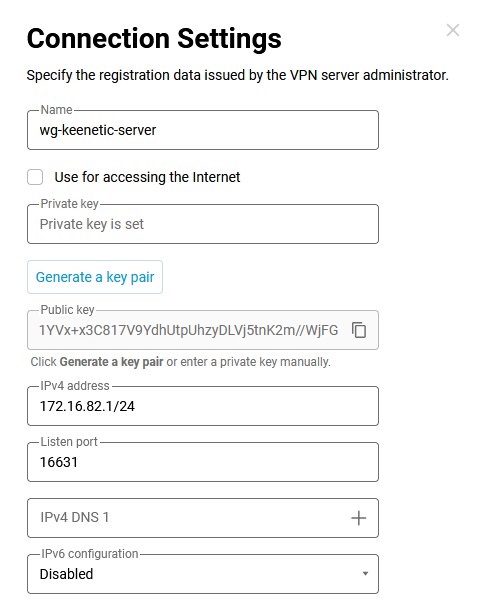
Nel campo AllowedIPs, inserire gli indirizzi IP consentiti in formato IP/bitmask —
172.16.82.1/32(l'indirizzo interno del server) e192.168.22.0/24(indirizzo del segmento locale del router Keenetic).Nel campo Endpoint, inserire l'indirizzo IP pubblico o il nome di dominio del server WireGuard e la porta di ascolto su cui il client WireGuard stabilirà la comunicazione.
Nel campo PersistentKeepalive, inserire la frequenza dei tentativi di verifica della disponibilità del lato remoto della connessione. Solitamente, è sufficiente un intervallo di
3-5secondi tra un controllo e l'altro.Configurare una connessione remota sul lato del server WireGuard precedentemente configurato.
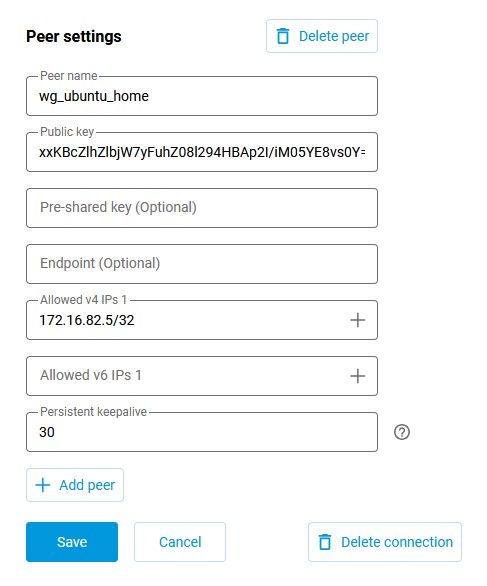
Connettersi all' interfaccia web del router e andare alla pagina Altre connessioni nella sezione Internet. Fare clic sulla connessione WireGuard creata in precedenza (
wg-keenetic-server) e aggiungere le impostazioni del peer. Fare clic su Aggiungi peer per aprire la finestra delle impostazioni del peer, in cui specificare il nome del tunnelwg-ubuntu-home.Nel campo Chiave pubblica, inserire la chiave creata nel passaggio 2.
Come promemoria, la chiave può essere visualizzata con il comando
cat:[my@my-wrk-lnv wireguard]$
sudo cat public-keyxxKBcZlhZlbjW7yFuhZ08l294HBAp2I/iM05YE8vs0Y=Nel campo IP v4 consentiti, specificare l'indirizzo da cui sarà consentito il traffico al server in formato IP/bitmask —
172.16.82.5/32Nel campo Persistent keepalive, è necessario specificare la frequenza dei tentativi di verifica della disponibilità del lato remoto della connessione. Solitamente, un intervallo di
10-15secondi tra i controlli è sufficiente. Il valore predefinito di Persistent keepalive nelle impostazioni del peer Keenetic è di30secondi.Fare clic su Salva.
Creare una connessione WireGuard automatica all'avvio del sistema operativo tramite il sistema di inizializzazione Systemd, che consente di avviare e gestire i daemon di sistema di Linux:
[my@my-wrk-lnv ~]$
sudo systemctl enable wg-quick@wg-client.serviceCreated symlink /etc/systemd/system/multi-user.target.wants/wg-quick@wg-client.service → /lib/systemd/system/wg-quick@.service.Importante
Nel nome del servizio
***.serviceinserire il nome della configurazionewg-client.confAvviare la connessione WireGuard:
[my@my-wrk-lnv ~]$
sudo systemctl start wg-quick@wg-client.serviceImportante
Se il servizio non si avvia, è necessario controllare il registro di avvio con il comando
systemctl status wg-quick@wg-client.serviceojournalctl -xe:[my@my-wrk-lnv ~]$
systemctl status wg-quick@wg-client.servicewg-quick@wg-client.service - WireGuard via wg-quick(8) for wg/client Loaded: loaded (/lib/systemd/system/wg-quick@.service; indirect; vendor preset: enabled) Active: failed (Result: exit-code) since Wed 2020-04-22 19:55:59 MSK; 8s ago Docs: man:wg-quick(8)\ man:wg(8) https://www.wireguard.com/ https://www.wireguard.com/quickstart/ https://git.zx2c4.com/wireguard-tools/about/src/man/wg-quick.8 https://git.zx2c4.com/wireguard-tools/about/src/man/wg.8 Process: 8734 ExecStart=/usr/bin/wg-quick up wg-client (code=exited, status=127) Main PID: 8734 (code=exited, status=127) apr 22 19:55:59 my@my-wrk-lnv wg-quick[8734]: [#] ip link add wg-client type wireguard apr 22 19:55:59 my@my-wrk-lnv wg-quick[8734]: [#] wg setconf wg-client /dev/fd/63 apr 22 19:55:59 my@my-wrk-lnv wg-quick[8734]: [#] ip -4 address add 172.16.82.20/24 dev wg-client apr 22 19:55:59 my@my-wrk-lnv wg-quick[8734]: [#] ip link set mtu 1420 up dev wg-client apr 22 19:55:59 my@my-wrk-lnv wg-quick[8734]: [#] resolvconf -a wg-client -m 0 -xapr 22 19:55:59 my@my-wrk-lnv wg-quick[8734]: /usr/bin/wg-quick: line 31: resolvconf: command not foundapr 22 19:55:59 my@my-wrk-lnv wg-quick[8734]: [#] ip link delete dev wg-client apr 22 19:55:59 my@my-wrk-lnv systemd[1]: wg-quick@wg-client.service: Main process exited, code=exited, status=127/n/a apr 22 19:55:59 my@my-wrk-lnv systemd[1]: wg-quick@wg-client.service: Failed with result 'exit-code'. apr 22 19:55:59 my@my-wrk-lnv systemd[1]: Failed to start WireGuard via wg-quick(8) for wg/client.In base all'errore, non è installato il pacchetto
resolvconf, necessario perwg-quick, installare il pacchetto:[my@my-wrk-lnv ~]$
sudo apt install resolvconfReading package lists... Done Building dependency tree... Done Reading state information... Done The following NEW packages will be installed: resolvconf 0 upgraded, 1 newly installed, 0 to remove and 3 not upgraded. Need to get 54,7 kB of archives. After this operation, 203 kB of additional disk space will be used. Get:1 http://mirrors.daticum.com/ubuntu impish/universe amd64 resolvconf all 1.84ubuntu1 [54,7 kB] Fetched 54,7 kB in 0s (888 kB/s) Preconfiguring packages ... Selecting previously unselected package resolvconf. (Reading database ... 234409 files and directories currently installed.) Preparing to unpack .../resolvconf_1.84ubuntu1_all.deb ... Unpacking resolvconf (1.84ubuntu1) ... Setting up resolvconf (1.84ubuntu1) ... Created symlink /etc/systemd/system/sysinit.target.wants/resolvconf.service → /lib/systemd/system/resolvconf.service. Created symlink /etc/systemd/system/systemd-resolved.service.wants/resolvconf-pull-resolved.path → /lib/systemd/system/resolvconf-pull-resolved.path. Created symlink /etc/systemd/system/systemd-resolved.service.wants/resolvconf-pu ll-resolved.service → /lib/systemd/system/resolvconf-pull-resolved.service. Processing triggers for ureadahead (0.100.0-21) ... Processing triggers for man-db (2.9.4-2) ... Processing triggers for resolvconf (1.84ubuntu1) ...Dopo l'installazione del pacchetto, verificare che il servizio sia in esecuzione. Verifica della connessione:
[my@my-wrk-lnv ~]$
sudo wginterface: wg-client public key: xxKBcZlhZlbjW7yFuhZ08l294HBAp2I/iM05YE8vs0Y= private key: (hidden) listening port: 45757 peer: 1YVx+x3C817V9YdhUtpUhzyDLVj5tnK2m//WjFGynm4= endpoint: 193.0.174.159:16631 allowed ips: 172.16.82.1/32, 192.168.22.0/24 transfer: 0 B received, 148 B sent persistent keepalive: every 5 secondsPer verificare la disponibilità del server, è possibile inviare pacchetti ICMP all'indirizzo IP:
[my@my-wrk-lnv ~]$
ping -c 10 -s 100 192.168.22.1PING 192.168.22.1 (192.168.22.1) 100(128) bytes of data. 108 bytes from 192.168.22.1: icmp_seq=1 ttl=64 time=6.76 ms 108 bytes from 192.168.22.1: icmp_seq=2 ttl=64 time=6.70 ms 108 bytes from 192.168.22.1: icmp_seq=3 ttl=64 time=6.63 ms 108 bytes from 192.168.22.1: icmp_seq=4 ttl=64 time=6.84 ms 108 bytes from 192.168.22.1: icmp_seq=5 ttl=64 time=6.57 ms 108 bytes from 192.168.22.1: icmp_seq=6 ttl=64 time=6.24 ms 108 bytes from 192.168.22.1: icmp_seq=7 ttl=64 time=9.92 ms 108 bytes from 192.168.22.1: icmp_seq=8 ttl=64 time=9.75 ms 108 bytes from 192.168.22.1: icmp_seq=9 ttl=64 time=5.77 ms 108 bytes from 192.168.22.1: icmp_seq=10 ttl=64 time=7.03 ms --- 192.168.22.1 ping statistics --- 10 packets transmitted, 10 received, 0% packet loss, time 9014ms rtt min/avg/max/mdev = 5.778/7.225/9.920/1.349 msPer disabilitare l'avvio automatico della connessione WireGuard all'avvio del sistema operativo, tramite il sistema di inizializzazione Systemd, inserire il seguente comando:
[my@my-wrk-lnv ~]$
sudo systemctl disable wg-quick@wg-client.serviceRemoved /etc/systemd/system/multi-user.target.wants/wg-quick@wg-client.servicePer interrompere la connessione WireGuard, inserire il seguente comando:
[my@my-wrk-lnv ~]$
sudo systemctl stop wg-quick@wg-client.serviceConfigurazione completata.
Una variante di installazione e configurazione tramite NetworkManager
La GUI di NetworkManager è una shell grafica per il software di gestione delle connessioni di rete.
Breve sequenza di comandi:
git clone https://github.com/max-moser/network-manager-wireguardcd network-manager-wireguard./autogen.sh --without-libnm-glib./configure --without-libnm-glib --prefix=/usr --sysconfdir=/etc --libdir=/usr/lib/x86_64-linux-gnu --libexecdir=/usr/lib/NetworkManager --localstatedir=/varmakesudo make install
Importante
Se l'installazione del plugin non viene completata con successo o se non ci sono abbastanza pacchetti per installare il plugin, eseguire:
sudo apt install wireguard git dh-autoreconf libglib2.0-dev intltool build-essential libgtk-3-dev libnma-dev libsecret-1-dev network-manager-dev resolvconf
Sequenza di comandi dettagliata:
Clonare il codice del plugin dal repository Github:
[my@my-wrk-lnv ~]$
git clone https://github.com/max-moser/network-manager-wireguardCloning into 'network-manager-wireguard'... remote: Enumerating objects: 534, done. remote: Total 534 (delta 0), reused 0 (delta 0), pack-reused 534 Receiving objects: 100% (534/534), 748.44 KiB | 1.63 MiB/s, done. Resolving deltas: 100% (317/317), done.Andare alla directory
network-manager-wireguarde compilare il plugin per la configurazione grafica del tunnel Wireguard:[my@my-wrk-lnv ~]$
cd network-manager-wireguard[my@my-wrk-lnv network-manager-wireguard](master)$./autogen.sh --without-libnm-gliblibtoolize: putting auxiliary files in '.'. libtoolize: linking file './ltmain.sh' libtoolize: putting macros in AC_CONFIG_MACRO_DIRS, 'm4'. libtoolize: linking file 'm4/libtool.m4' libtoolize: linking file 'm4/ltoptions.m4' libtoolize: linking file 'm4/ltsugar.m4' libtoolize: linking file 'm4/ltversion.m4' libtoolize: linking file 'm4/lt~obsolete.m4' configure.ac:19: installing './compile' configure.ac:19: installing './config.guess' configure.ac:19: installing './config.sub' configure.ac:7: installing './install-sh' configure.ac:7: installing './missing' Makefile.am: installing './depcomp' parallel-tests: installing './test-driver' checking for a BSD-compatible install... /usr/bin/install -c checking whether build environment is sane... yes checking for a thread-safe mkdir -p... /bin/mkdir -p checking for gawk... gawk checking whether make sets $(MAKE)... yes checking whether make supports nested variables... yes checking whether UID '1000' is supported by ustar format... yes checking whether GID '1000' is supported by ustar format... yes checking how to create a ustar tar archive... gnutar checking whether to enable maintainer-specific portions of Makefiles... yes checking whether make supports nested variables... (cached) yes checking for gcc-ar... gcc-ar checking for gcc-ranlib... gcc-ranlib checking build system type... x86_64-pc-linux-gnu checking host system type... x86_64-pc-linux-gnu checking how to print strings... printf checking for style of include used by make... GNU checking for gcc... gcc checking whether the C compiler works... yes checking for C compiler default output file name... a.out checking for suffix of executables... checking whether we are cross compiling... no checking for suffix of object files... o checking whether we are using the GNU C compiler... yes checking whether gcc accepts -g... yes checking for gcc option to accept ISO C89... none needed checking whether gcc understands -c and -o together... yes checking dependency style of gcc... gcc3 checking for a sed that does not truncate output... /bin/sed checking for grep that handles long lines and -e... /bin/grep checking for egrep... /bin/grep -E checking for fgrep... /bin/grep -F checking for ld used by gcc... /usr/bin/ld checking if the linker (/usr/bin/ld) is GNU ld... yes checking for BSD- or MS-compatible name lister (nm)... /usr/bin/nm -B checking the name lister (/usr/bin/nm -B) interface... BSD nm checking whether ln -s works... yes checking the maximum length of command line arguments... 1572864 checking how to convert x86_64-pc-linux-gnu file names to x86_64-pc-linux-gnu format... func_convert_file_noop checking how to convert x86_64-pc-linux-gnu file names to toolchain format... func_convert_file_noop checking for /usr/bin/ld option to reload object files... -r checking for objdump... objdump checking how to recognize dependent libraries... pass_all checking for dlltool... no checking how to associate runtime and link libraries... printf %s\n checking for archiver @FILE support... @ checking for strip... strip checking for ranlib... (cached) gcc-ranlib checking command to parse /usr/bin/nm -B output from gcc object... ok checking for sysroot... no checking for a working dd... /bin/dd checking how to truncate binary pipes... /bin/dd bs=4096 count=1 checking for mt... mt checking if mt is a manifest tool... no checking how to run the C preprocessor... gcc -E checking for ANSI C header files... yes checking for sys/types.h... yes checking for sys/stat.h... yes checking for stdlib.h... yes checking for string.h... yes checking for memory.h... yes checking for strings.h... yes checking for inttypes.h... yes checking for stdint.h... yes checking for unistd.h... yes checking for dlfcn.h... yes checking for objdir... .libs checking if gcc supports -fno-rtti -fno-exceptions... no checking for gcc option to produce PIC... -fPIC -DPIC checking if gcc PIC flag -fPIC -DPIC works... yes checking if gcc static flag -static works... yes checking if gcc supports -c -o file.o... yes checking if gcc supports -c -o file.o... (cached) yes checking whether the gcc linker (/usr/bin/ld -m elf_x86_64) supports shared libraries... yes checking whether -lc should be explicitly linked in... no checking dynamic linker characteristics... GNU/Linux ld.so checking how to hardcode library paths into programs... immediate checking whether stripping libraries is possible... yes checking if libtool supports shared libraries... yes checking whether to build shared libraries... yes checking whether to build static libraries... no checking for gcc... (cached) gcc checking whether we are using the GNU C compiler... (cached) yes checking whether gcc accepts -g... (cached) yes checking for gcc option to accept ISO C89... (cached) none needed checking whether gcc understands -c and -o together... (cached) yes checking dependency style of gcc... (cached) gcc3 checking for glib-compile-resources... /usr/bin/glib-compile-resources checking for ANSI C header files... (cached) yes checking fcntl.h usability... yes checking fcntl.h presence... yes checking for fcntl.h... yes checking paths.h usability... yes checking paths.h presence... yes checking for paths.h... yes checking sys/ioctl.h usability... yes checking sys/ioctl.h presence... yes checking for sys/ioctl.h... yes checking sys/time.h usability... yes checking sys/time.h presence... yes checking for sys/time.h... yes checking syslog.h usability... yes checking syslog.h presence... yes checking for syslog.h... yes checking for unistd.h... (cached) yes checking for mode_t... yes checking for pid_t... yes checking whether time.h and sys/time.h may both be included... yes checking whether gcc needs -traditional... no checking for working memcmp... yes checking for select... yes checking for socket... yes checking for uname... yes checking for library containing dlopen... -ldl checking whether NLS is requested... yes checking for intltool >= 0.35... 0.51.0 found checking for intltool-update... /usr/bin/intltool-update checking for intltool-merge... /usr/bin/intltool-merge checking for intltool-extract... /usr/bin/intltool-extract checking for xgettext... /usr/bin/xgettext checking for msgmerge... /usr/bin/msgmerge checking for msgfmt... /usr/bin/msgfmt checking for gmsgfmt... /usr/bin/msgfmt checking for perl... /usr/bin/perl checking for perl >= 5.8.1... 5.26.1 checking for XML::Parser... ok checking locale.h usability... yes checking locale.h presence... yes checking for locale.h... yes checking for LC_MESSAGES... yes checking for CFPreferencesCopyAppValue... no checking for CFLocaleCopyCurrent... no checking libintl.h usability... yes checking libintl.h presence... yes checking for libintl.h... yes checking for ngettext in libc... yes checking for dgettext in libc... yes checking for bind_textdomain_codeset... yes checking for msgfmt... (cached) /usr/bin/msgfmt checking for dcgettext... yes checking if msgfmt accepts -c... yes checking for gmsgfmt... (cached) /usr/bin/msgfmt checking for xgettext... (cached) /usr/bin/xgettext checking for pkg-config... /usr/bin/pkg-config checking pkg-config is at least version 0.9.0... yes checking for GLIB... yes checking for GTK... yes checking for LIBNMA... yes checking for LIBSECRET... yes checking for LIBNM... yes checking for more warnings... yes checking whether -Wunknown-warning-option works as expected... not supported checking whether "-Wextra" works as expected... yes checking whether "-Wdeclaration-after-statement" works as expected... yes checking whether "-Wfloat-equal" works as expected... yes checking whether "-Wformat-nonliteral" works as expected... yes checking whether "-Wformat-security" works as expected... yes checking whether "-Wimplicit-fallthrough" works as expected... yes checking whether "-Wimplicit-function-declaration" works as expected... yes checking whether "-Winit-self" works as expected... yes checking whether "-Wlogical-op" works as expected... yes checking whether "-Wmissing-declarations" works as expected... yes checking whether "-Wmissing-include-dirs" works as expected... yes checking whether "-Wmissing-prototypes" works as expected... yes checking whether "-Wpointer-arith" works as expected... yes checking whether "-Wshadow" works as expected... yes checking whether "-Wshift-negative-value" works as expected... yes checking whether "-Wstrict-prototypes" works as expected... yes checking whether "-Wundef" works as expected... yes checking whether "-Wno-duplicate-decl-specifier" works as expected... yes checking whether "-Wno-format-truncation" works as expected... yes checking whether "-Wno-format-y2k" works as expected... yes checking whether "-Wno-missing-field-initializers" works as expected... yes checking whether "-Wno-pragmas" works as expected... yes checking whether "-Wno-sign-compare" works as expected... yes checking whether "-Wno-unused-but-set-variable" works as expected... yes checking whether "-Wno-unused-parameter" works as expected... yes checking whether -Wunknown-attributes works as expected... not supported checking whether -Wtypedef-redefinition works as expected... not supported checking whether -Warray-bounds works as expected... yes checking whether -Wparentheses-equality works as expected... not supported checking whether -Wunused-value works as expected... yes checking whether -Wmissing-braces works as expected... no checking if gcc supports flag -fdata-sections -ffunction-sections -Wl,--gc-sections in envvar CFLAGS... yes checking that generated files are newer than configure... done configure: creating ./config.status config.status: creating Makefile config.status: creating po/Makefile.in config.status: creating config.h config.status: executing depfiles commands config.status: executing libtool commands config.status: executing default-1 commands config.status: executing po/stamp-it commands Build configuration: --with-gnome=yes --with-libnm-glib=no --enable-absolute-paths=no --enable-more-warnings=yes --enable-lto=no --enable-ld-gc=yes[my@my-wrk-lnv network-manager-wireguard](master)$
./configure --without-libnm-glib --prefix=/usr --sysconfdir=/etc --libdir=/usr/lib/x86_64-linux-gnu --libexecdir=/usr/lib/NetworkManager --localstatedir=/varchecking for a BSD-compatible install... /usr/bin/install -c checking whether build environment is sane... yes checking for a thread-safe mkdir -p... /bin/mkdir -p checking for gawk... gawk checking whether make sets $(MAKE)... yes checking whether make supports nested variables... yes checking whether UID '1000' is supported by ustar format... yes checking whether GID '1000' is supported by ustar format... yes checking how to create a ustar tar archive... gnutar checking whether to enable maintainer-specific portions of Makefiles... no checking whether make supports nested variables... (cached) yes checking for gcc-ar... gcc-ar checking for gcc-ranlib... gcc-ranlib checking build system type... x86_64-pc-linux-gnu checking host system type... x86_64-pc-linux-gnu checking how to print strings... printf checking for style of include used by make... GNU checking for gcc... gcc checking whether the C compiler works... yes checking for C compiler default output file name... a.out checking for suffix of executables... checking whether we are cross compiling... no checking for suffix of object files... o checking whether we are using the GNU C compiler... yes checking whether gcc accepts -g... yes checking for gcc option to accept ISO C89... none needed checking whether gcc understands -c and -o together... yes checking dependency style of gcc... gcc3 checking for a sed that does not truncate output... /bin/sed checking for grep that handles long lines and -e... /bin/grep checking for egrep... /bin/grep -E checking for fgrep... /bin/grep -F checking for ld used by gcc... /usr/bin/ld checking if the linker (/usr/bin/ld) is GNU ld... yes checking for BSD- or MS-compatible name lister (nm)... /usr/bin/nm -B checking the name lister (/usr/bin/nm -B) interface... BSD nm checking whether ln -s works... yes checking the maximum length of command line arguments... 1572864 checking how to convert x86_64-pc-linux-gnu file names to x86_64-pc-linux-gnu format... func_convert_file_noop checking how to convert x86_64-pc-linux-gnu file names to toolchain format... func_convert_file_noop checking for /usr/bin/ld option to reload object files... -r checking for objdump... objdump checking how to recognize dependent libraries... pass_all checking for dlltool... no checking how to associate runtime and link libraries... printf %s\n checking for archiver @FILE support... @ checking for strip... strip checking for ranlib... (cached) gcc-ranlib checking command to parse /usr/bin/nm -B output from gcc object... ok checking for sysroot... no checking for a working dd... /bin/dd checking how to truncate binary pipes... /bin/dd bs=4096 count=1 checking for mt... mt checking if mt is a manifest tool... no checking how to run the C preprocessor... gcc -E checking for ANSI C header files... yes checking for sys/types.h... yes checking for sys/stat.h... yes checking for stdlib.h... yes checking for string.h... yes checking for memory.h... yes checking for strings.h... yes checking for inttypes.h... yes checking for stdint.h... yes checking for unistd.h... yes checking for dlfcn.h... yes checking for objdir... .libs checking if gcc supports -fno-rtti -fno-exceptions... no checking for gcc option to produce PIC... -fPIC -DPIC checking if gcc PIC flag -fPIC -DPIC works... yes checking if gcc static flag -static works... yes checking if gcc supports -c -o file.o... yes checking if gcc supports -c -o file.o... (cached) yes checking whether the gcc linker (/usr/bin/ld -m elf_x86_64) supports shared libraries... yes checking whether -lc should be explicitly linked in... no checking dynamic linker characteristics... GNU/Linux ld.so checking how to hardcode library paths into programs... immediate checking whether stripping libraries is possible... yes checking if libtool supports shared libraries... yes checking whether to build shared libraries... yes checking whether to build static libraries... no checking for gcc... (cached) gcc checking whether we are using the GNU C compiler... (cached) yes checking whether gcc accepts -g... (cached) yes checking for gcc option to accept ISO C89... (cached) none needed checking whether gcc understands -c and -o together... (cached) yes checking dependency style of gcc... (cached) gcc3 checking for glib-compile-resources... /usr/bin/glib-compile-resources checking for ANSI C header files... (cached) yes checking fcntl.h usability... yes checking fcntl.h presence... yes checking for fcntl.h... yes checking paths.h usability... yes checking paths.h presence... yes checking for paths.h... yes checking sys/ioctl.h usability... yes checking sys/ioctl.h presence... yes checking for sys/ioctl.h... yes checking sys/time.h usability... yes checking sys/time.h presence... yes checking for sys/time.h... yes checking syslog.h usability... yes checking syslog.h presence... yes checking for syslog.h... yes checking for unistd.h... (cached) yes checking for mode_t... yes checking for pid_t... yes checking whether time.h and sys/time.h may both be included... yes checking whether gcc needs -traditional... no checking for working memcmp... yes checking for select... yes checking for socket... yes checking for uname... yes checking for library containing dlopen... -ldl checking whether NLS is requested... yes checking for intltool >= 0.35... 0.51.0 found checking for intltool-update... /usr/bin/intltool-update checking for intltool-merge... /usr/bin/intltool-merge checking for intltool-extract... /usr/bin/intltool-extract checking for xgettext... /usr/bin/xgettext checking for msgmerge... /usr/bin/msgmerge checking for msgfmt... /usr/bin/msgfmt checking for gmsgfmt... /usr/bin/msgfmt checking for perl... /usr/bin/perl checking for perl >= 5.8.1... 5.26.1 checking for XML::Parser... ok checking locale.h usability... yes checking locale.h presence... yes checking for locale.h... yes checking for LC_MESSAGES... yes checking for CFPreferencesCopyAppValue... no checking for CFLocaleCopyCurrent... no checking libintl.h usability... yes checking libintl.h presence... yes checking for libintl.h... yes checking for ngettext in libc... yes checking for dgettext in libc... yes checking for bind_textdomain_codeset... yes checking for msgfmt... (cached) /usr/bin/msgfmt checking for dcgettext... yes checking if msgfmt accepts -c... yes checking for gmsgfmt... (cached) /usr/bin/msgfmt checking for xgettext... (cached) /usr/bin/xgettext checking for pkg-config... /usr/bin/pkg-config checking pkg-config is at least version 0.9.0... yes checking for GLIB... yes checking for GTK... yes checking for LIBNMA... yes checking for LIBSECRET... yes checking for LIBNM... yes checking for more warnings... yes checking whether -Wunknown-warning-option works as expected... not supported checking whether "-Wextra" works as expected... yes checking whether "-Wdeclaration-after-statement" works as expected... yes checking whether "-Wfloat-equal" works as expected... yes checking whether "-Wformat-nonliteral" works as expected... yes checking whether "-Wformat-security" works as expected... yes checking whether "-Wimplicit-fallthrough" works as expected... yes checking whether "-Wimplicit-function-declaration" works as expected... yes checking whether "-Winit-self" works as expected... yes checking whether "-Wlogical-op" works as expected... yes checking whether "-Wmissing-declarations" works as expected... yes checking whether "-Wmissing-include-dirs" works as expected... yes checking whether "-Wmissing-prototypes" works as expected... yes checking whether "-Wpointer-arith" works as expected... yes checking whether "-Wshadow" works as expected... yes checking whether "-Wshift-negative-value" works as expected... yes checking whether "-Wstrict-prototypes" works as expected... yes checking whether "-Wundef" works as expected... yes checking whether "-Wno-duplicate-decl-specifier" works as expected... yes checking whether "-Wno-format-truncation" works as expected... yes checking whether "-Wno-format-y2k" works as expected... yes checking whether "-Wno-missing-field-initializers" works as expected... yes checking whether "-Wno-pragmas" works as expected... yes checking whether "-Wno-sign-compare" works as expected... yes checking whether "-Wno-unused-but-set-variable" works as expected... yes checking whether "-Wno-unused-parameter" works as expected... yes checking whether -Wunknown-attributes works as expected... not supported checking whether -Wtypedef-redefinition works as expected... not supported checking whether -Warray-bounds works as expected... yes checking whether -Wparentheses-equality works as expected... not supported checking whether -Wunused-value works as expected... yes checking whether -Wmissing-braces works as expected... no checking if gcc supports flag -fdata-sections -ffunction-sections -Wl,--gc-sections in envvar CFLAGS... yes checking that generated files are newer than configure... done configure: creating ./config.status config.status: creating Makefile config.status: creating po/Makefile.in config.status: creating config.h config.status: config.h is unchanged config.status: executing depfiles commands config.status: executing libtool commands config.status: executing default-1 commands config.status: executing po/stamp-it commands Build configuration: --with-gnome=yes --with-libnm-glib=no --enable-absolute-paths=no --enable-more-warnings=yes --enable-lto=no --enable-ld-gc=yes[my@my-wrk-lnv network-manager-wireguard](master)$
makeXMLLINT not set and xmllint not found in path; skipping xml preprocessing. make all-recursive make[1]: Entering directory «/home/my/network-manager-wireguard» XMLLINT not set and xmllint not found in path; skipping xml preprocessing. Making all in . make[2]: Entering directory «/home/my/network-manager-wireguard» XMLLINT not set and xmllint not found in path; skipping xml preprocessing. CC shared/nm-utils/src_libnm_utils_la-nm-shared-utils.lo In file included from ./shared/nm-default.h:49:0, from shared/nm-utils/nm-shared-utils.c:22: /usr/include/libnm/nm-version.h:155:30: warning: "NM_VERSION_1_10_14" is not defined, evaluates to 0 [-Wundef] #if NM_VERSION_MAX_ALLOWED < NM_VERSION_1_10_14 ^~~~~~~~~~~~~~~~~~ CC shared/src_libnm_utils_la-utils.lo In file included from shared/nm-default.h:49:0, from shared/utils.c:22: /usr/include/libnm/nm-version.h:155:30: warning: "NM_VERSION_1_10_14" is not defined, evaluates to 0 [-Wundef] #if NM_VERSION_MAX_ALLOWED < NM_VERSION_1_10_14 ^~~~~~~~~~~~~~~~~~ CCLD auth-dialog/nm-wireguard-auth-dialog ITMRG appdata/network-manager-wireguard.metainfo.xml GEN nm-wireguard-service.name make[2]: Leaving directory «/home/my/network-manager-wireguard» Making all in po make[2]: Entering directory «/home/my/network-manager-wireguard/po» MSGFMT de.gmo MSGFMT en_GB.gmo make[2]: Leaving directory «/home/my/network-manager-wireguard/po» make[1]: Leaving directory «/home/my/network-manager-wireguard»[my@my-wrk-lnv network-manager-wireguard](master)$
sudo make install[sudo] password for my: XMLLINT not set and xmllint not found in path; skipping xml preprocessing. Making install in . make[1]: Entering directory «/home/my/network-manager-wireguard» >XMLLINT not set and xmllint not found in path; skipping xml preprocessing. make[2]: Entering directory «/home/my/network-manager-wireguard» XMLLINT not set and xmllint not found in path; skipping xml preprocessing. /bin/mkdir -p '/usr/lib/NetworkManager' /bin/bash ./libtool --mode=install /usr/bin/install -c src/nm-wireguard-service auth-dialog/nm-wireguard-auth-dialog '/usr/lib/NetworkManager' libtool: install: /usr/bin/install -c src/nm-wireguard-service /usr/lib/NetworkManager/nm-wireguard-service libtool: install: /usr/bin/install -c auth-dialog/nm-wireguard-auth-dialog /usr/lib/NetworkManager/nm-wireguard-auth-dialog /bin/mkdir -p '/usr/share/appdata' /usr/bin/install -c -m 644 appdata/network-manager-wireguard.metainfo.xml '/usr/share/appdata' /bin/mkdir -p '/etc/dbus-1/system.d' /usr/bin/install -c -m 644 nm-wireguard-service.conf '/etc/dbus-1/system.d' /bin/mkdir -p '/usr/lib/NetworkManager/VPN' /usr/bin/install -c -m 644 nm-wireguard-service.name '/usr/lib/NetworkManager/VPN' /bin/mkdir -p '/usr/lib/x86_64-linux-gnu/NetworkManager' /bin/bash ./libtool --mode=install /usr/bin/install -c properties/libnm-vpn-plugin-wireguard.la properties/libnm-vpn-plugin-wireguard-editor.la '/usr/lib/x86_64-linux-gnu/NetworkManager' libtool: install: /usr/bin/install -c properties/.libs/libnm-vpn-plugin-wireguard.so /usr/lib/x86_64-linux-gnu/NetworkManager/libnm-vpn-plugin-wireguard.so libtool: install: /usr/bin/install -c properties/.libs/libnm-vpn-plugin-wireguard.lai /usr/lib/x86_64-linux-gnu/NetworkManager/libnm-vpn-plugin-wireguard.la libtool: install: /usr/bin/install -c properties/.libs/libnm-vpn-plugin-wireguard-editor.so /usr/lib/x86_64-linux-gnu/NetworkManager/libnm-vpn-plugin-wireguard-editor.so libtool: install: /usr/bin/install -c properties/.libs/libnm-vpn-plugin-wireguard-editor.lai /usr/lib/x86_64-linux-gnu/NetworkManager/libnm-vpn-plugin-wireguard-editor.la libtool: finish: PATH="/usr/local/sbin:/usr/local/bin:/usr/sbin:/usr/bin:/sbin:/bin:/snap/bin:/sbin" ldconfig -n /usr/lib/x86_64-linux-gnu/NetworkManager done installing de.gmo as /usr/share/locale/de/LC_MESSAGES/NetworkManager-wireguard.mo installing en_GB.gmo as /usr/share/locale/en_GB/LC_MESSAGES/NetworkManager-wireguard.mo make[1]: Leaving directory «/home/my/network-manager-wireguard/po»Riavviare il computer e verificare la disponibilità delle impostazioni di Wireguard nel pannello Connessioni di rete:
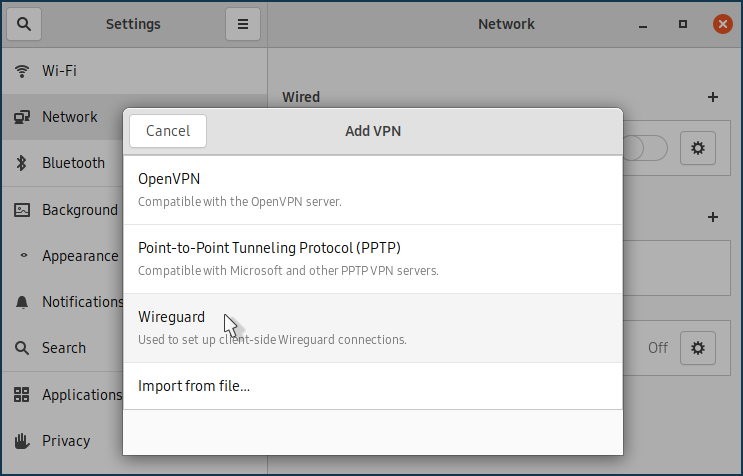
Configurazione della connessione al server Wireguard:
Generare le chiavi privata e pubblica, come descritto in Una variante di installazione e configurazione utilizzando il terminale (2° passaggio).
Se le chiavi sono state generate in precedenza nel sistema, è necessario visualizzarle nel terminale e copiarle negli appunti una per una:
[my@my-wrk-lnv wireguard]$
sudo cat private-key0CwJzxW0yOG4I9XWl9Wo9nzpxen2G0VlTAxD7XEBVmE= [my@my-wrk-lnv wireguard]$sudo cat public-keyM2LeCzN8mFLpa6Xz3BNHFgtNt8kY4wluiwt+NJFTgxk=Copiare la chiave privata e incollarla nel campo Chiave privata delle impostazioni del tunnel:
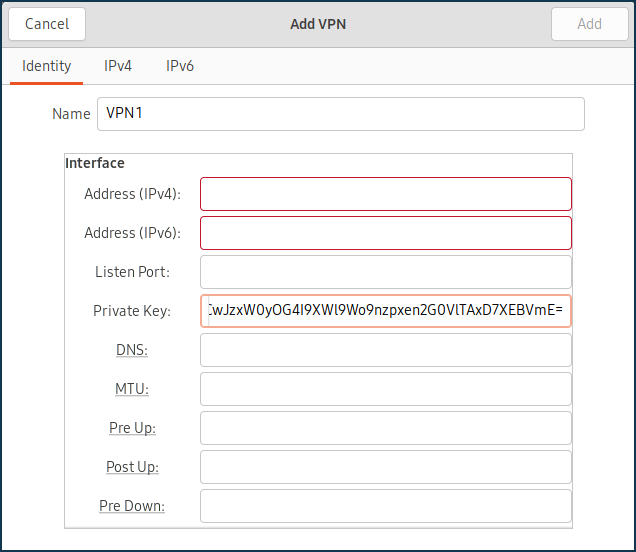
Copiare la chiave pubblica e incollarla nel server WireGuard precedentemente configurato nel campo Chiave pubblica.
Nel campo IP v4 consentiti, specificare l'indirizzo da cui il traffico sarà consentito al server in formato IP/bitmask —
172.16.82.8/32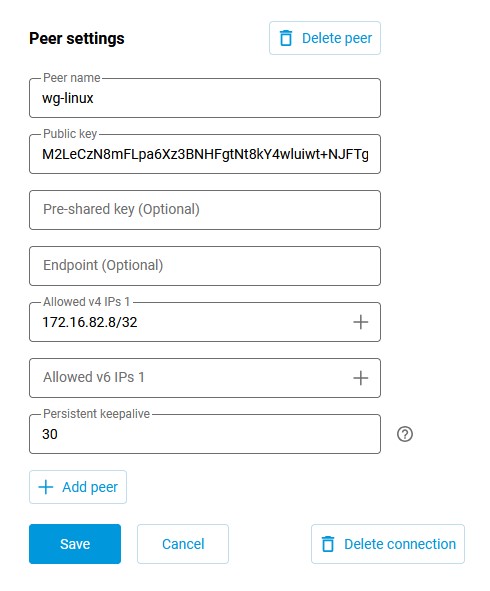
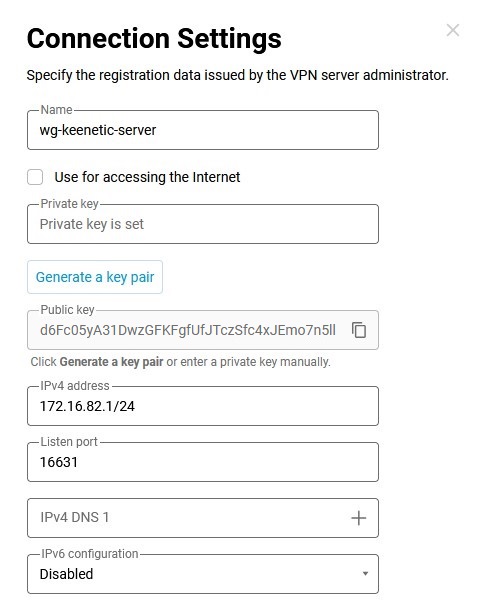
Nel campo Chiave pubblica, inserire la chiave pubblica del server, che può essere copiata negli appunti del computer dalle impostazioni di WireGuard nell'interfaccia web del router:
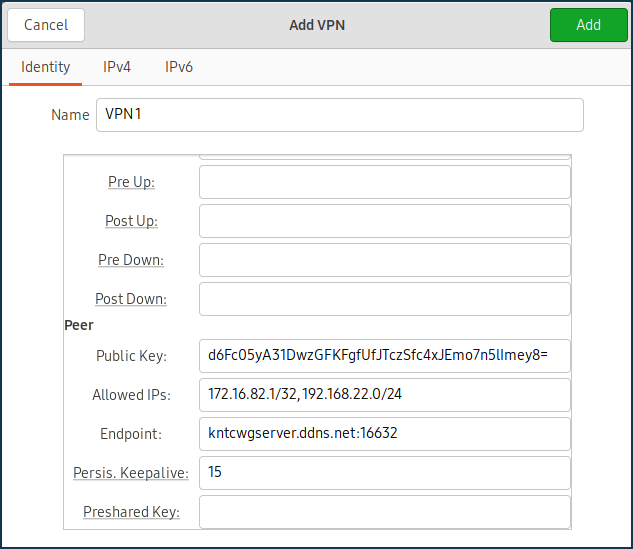
Nel campo IP consentiti, specificare gli indirizzi IP consentiti in formato IP/bitmask —
172.16.82.1/32(l'indirizzo interno del server) e192.168.22.0/24(l'indirizzo del segmento locale del router Keenetic).Nel campo Endpoint, specificare l'indirizzo IP pubblico o il nome di dominio del server WireGuard e la porta di ascolto su cui il client WireGuard stabilirà la connessione.
Nel campo PersistentKeepalive, specificare la frequenza dei tentativi di verifica della disponibilità del lato remoto della connessione. Solitamente, è sufficiente un intervallo di
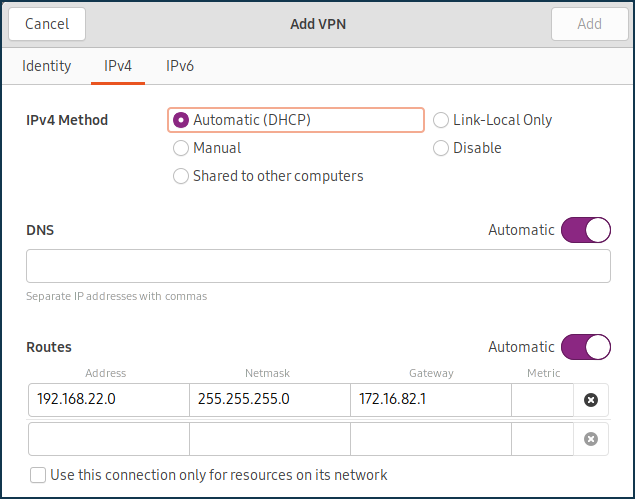
3-5secondi tra un controllo e l'altro.Nella scheda IPv4, nella sezione Route, aggiungere una route al segmento di rete locale del router Keenetic:
Connettersi al server Wireguard e assicurarsi che non ci siano messaggi di errore.
Per verificare la disponibilità del server, è possibile inviare pacchetti ICMP all'indirizzo IP del segmento locale del proprio router Keenetic:
[my@my-wrk-lnv ~]$ ping -c 10 -s 100 192.168.22.1
PING 192.168.22.1 (192.168.22.1) 100(128) bytes of data.
108 bytes from 192.168.22.1: icmp_seq=1 ttl=64 time=5.40 ms
108 bytes from 192.168.22.1: icmp_seq=2 ttl=64 time=6.60 ms
108 bytes from 192.168.22.1: icmp_seq=3 ttl=64 time=7.99 ms
108 bytes from 192.168.22.1: icmp_seq=4 ttl=64 time=7.04 ms
108 bytes from 192.168.22.1: icmp_seq=5 ttl=64 time=6.31 ms
108 bytes from 192.168.22.1: icmp_seq=6 ttl=64 time=7.42 ms
108 bytes from 192.168.22.1: icmp_seq=7 ttl=64 time=6.55 ms
108 bytes from 192.168.22.1: icmp_seq=8 ttl=64 time=7.14 ms
108 bytes from 192.168.22.1: icmp_seq=9 ttl=64 time=8.47 ms
108 bytes from 192.168.22.1: icmp_seq=10 ttl=64 time=7.52 ms
--- 192.168.22.1 ping statistics ---
10 packets transmitted, 10 received, 0% packet loss, time 9015ms
rtt min/avg/max/mdev = 5.402/7.049/8.470/0.834 ms