KeeneticOS 5.2
KeeneticOS release notes for Keenetic Sprinter (KN-3710) in the Development Channel
KeeneticOS releases in this channel show what we're working on right now. We update roughly weekly. N.B.: While releases in this channel do undergo testing, they are still sometimes bugs present, as we want you, our community, to share in what's new as soon as possible. Your input is really valued.
Keenetic Sprinter (KN-3710) is currently in the Standard Updates support period and receives regular software updates, including security enhancements, new features, operating system updates, and bug fixes.
KeeneticOS 5.2 Beta 2
27/10/2026
Improved
Fixed
KeeneticOS 5.2 Beta 1
19/10/2026
New
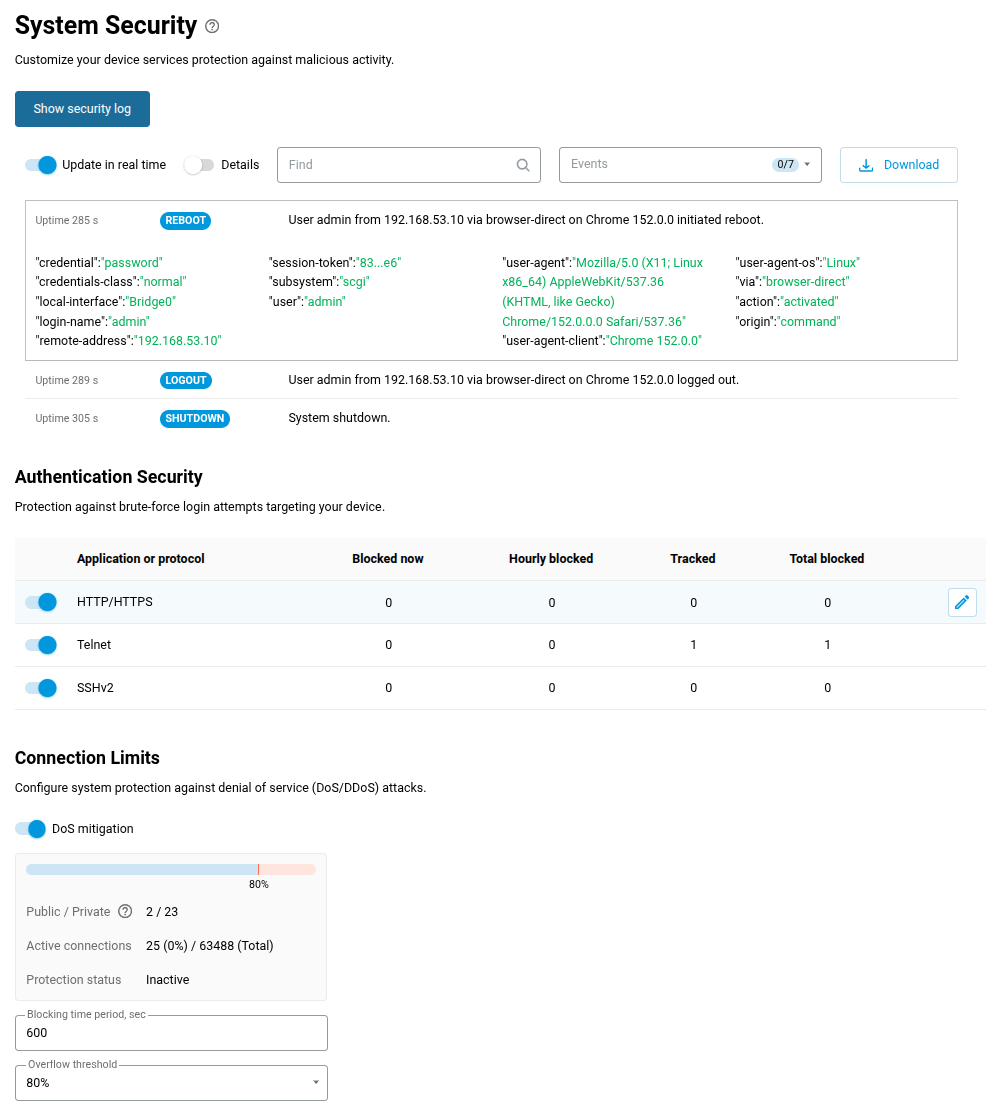
Added System Security page featuring a display of system events in the Security Log, brute-force protection settings for network services, and DoS attack mitigation controls. [NWI-5104]
Improved
Fixed
KeeneticOS 5.2 Beta 0
02/10/2026
Improved
The following improvements have been applied to the Web Interface.
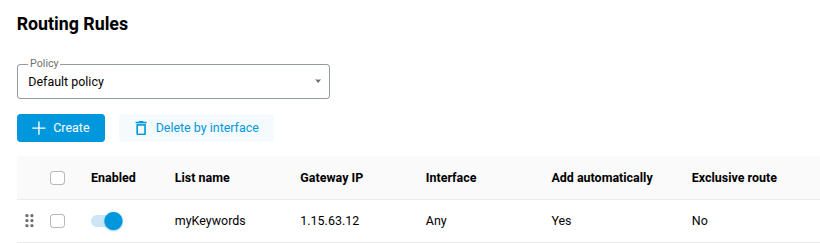
Added a Policy selector to the Routing menu, enabling configuration of separate routing tables for each Internet access policy. [NWI-5088]
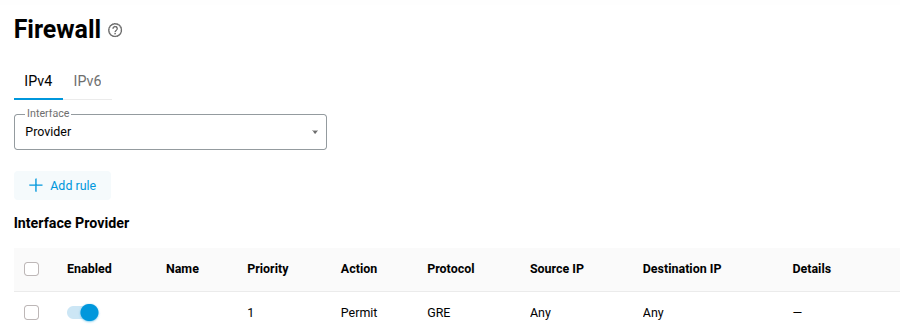
Added an Interface selector to the Firewall menu for quick access to rules for a specific network. [NWI-5089]
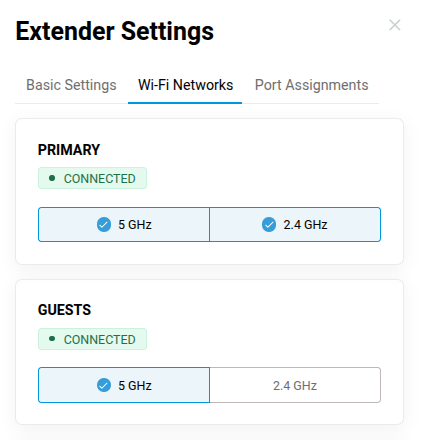
Added the Wi-Fi Networks tab to Extender Settings to select broadcast bands for any network on each Wi-Fi System node. [NWI-5064]
Improved filtering by client name on the Active Connections tab of the Diagnostics page. [NWI-5111]
Refined the deletion procedure and improved backward compatibility when configuring Wi-Fi networks. [NDM-4711]
Fixed
KeeneticOS 5.2 Alpha 11
25/09/2026
Improved
Upgraded the OpenVPN application to version 2.6.22-2, addressing the CVE-2026-84471 and CVE-2026-84732 vulnerabilities. [NDM-4707]
Upgraded the ca-certificates package to version 20260816, refreshing the Mozilla Root Certificate Authority bundle for improved certificate validation and enhanced security. [NDM-4705]
Upgraded the WireGuard implementation to support ASC version 3.1 parameters. [NDM-4641]
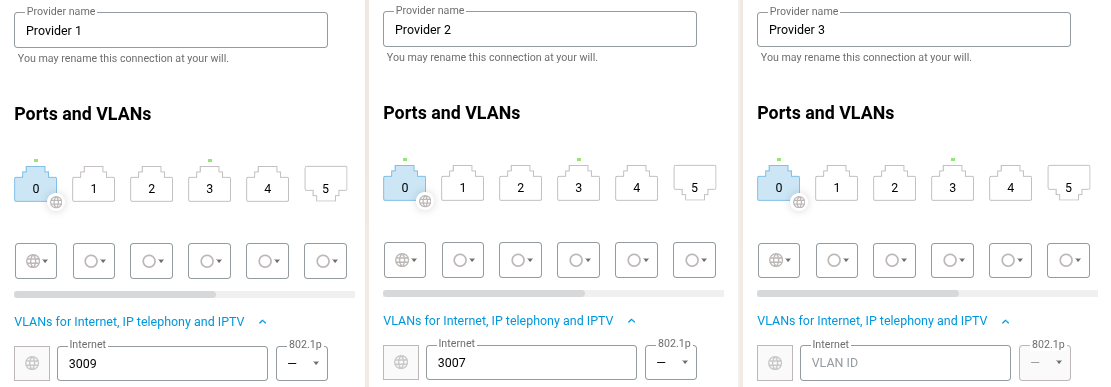
Added support to configure multiple Internet access providers on a single Ethernet port using separate VLANs via Web Interface. [NWI-1279]
Fixed
KeeneticOS 5.2 Alpha 10
18/09/2026
Improved
Fixed
KeeneticOS 5.2 Alpha 9
11/09/2026
Improved
Upgraded the curl utility to version 8.22.0, resolving the following security issues: CVE-2026-13608, CVE-2026-18924, CVE-2026-19931, CVE-2026-80229, CVE-2026-80230, CVE-2026-80231, CVE-2026-80255, CVE-2026-82208, and CVE-2026-82209. [NDM-4677]
Upgraded the libxml2 library to version 2.15.4, resolving the following security issues: CVE-2026-86137, CVE-2026-86138, CVE-2026-86139, CVE-2026-86140, CVE-2026-86141, CVE-2026-86142, CVE-2026-86143, and CVE-2026-86144. [NDM-4676]
Enabled Keyword Filter support in the IntelliQoS application classifier to improve detection efficiency. [NDM-4674]
The following improvements have been applied to the Web Interface.
Multiple blocking rules per client or segment can now be configured when setting up the Keyword Filter. [NWI-5077]
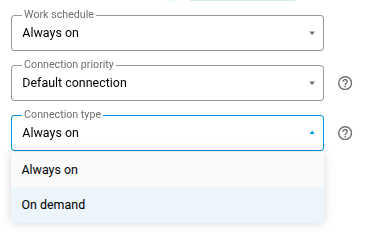
Added an option to select the On demand connection type for Ethernet, DSL and VPN connections to the Internet. [NWI-5072]
Improved the Keenetic Domain Name section with an option to change the registered name for the device. [NWI-5065]
Improved the display of longer texts by implementing line breaks based on syllables. [NWI-5074]
Fixed
KeeneticOS 5.2 Alpha 8
04/09/2026
Improved
Upgraded the OpenSSL library to version 3.5.8, addressing the CVE-2026-75803 vulnerability. [NDM-4664]
Updated SSL/TLS cipher suite configuration and added ML-KEM support for post-quantum cryptography. [NDM-4663]
The following improvements have been applied to the Web Interface.
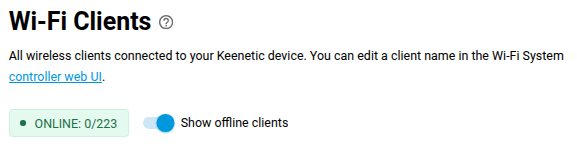
Enhanced the Clients page on Extender devices by adding an option to hide offline clients and a tooltip to display the client count by status. [NWI-5051]
Added a warning when the Registered Clients count reaches its limit. [NWI-713]
Fixed
KeeneticOS 5.2 Alpha 7
28/08/2026
Improved
The following improvements have been applied to the Web Interface.
Added post-quantum key exchange support with ML-KEM512, ML-KEM768, and ML-KEM1024 via Diffie-Hellman groups 35, 36, and 37 to Site-To-Site IPsec VPN Connections. [NWI-5050]
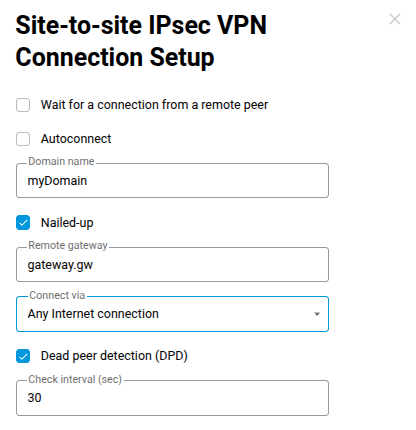
Enabled an option to specify the outbound interface for establishing Site-To-Site IPsec VPN Connections, ensuring correct source IP selection in multi-WAN environments. [NWI-5054]
Upgraded the OpenConnect to version 9.21, addressing multiple issues and enhancements. [NDM-4649]
Added cookie size validation to the OpenConnect VPN Server to prevent memory overwrites and process restarts by unauthenticated users. [NDM-4650]
Enhanced the brute-force lockout policy command set. [NDM-4655]
vpn-server lockout-policy (enable | threshold {thr} | duration {dur} | observation-window {wnd})— set up the lockout policy for the PPTP VPN Server application;ip [http|telnet|ssh] lockout-policy (enable | threshold {thr} | duration {dur} | observation-window {wnd})— set up the lockout policy for device management sessions;show vpn-server lockout-policy— display the lockout details for the PPTP VPN Server application;show ip [http|telnet|ssh] lockout-policy— display the lockout details for device management sessions.
Fixed
KeeneticOS 5.2 Alpha 6
21/08/2026
Improved
Fixed
KeeneticOS 5.2 Alpha 5
14/08/2026
New
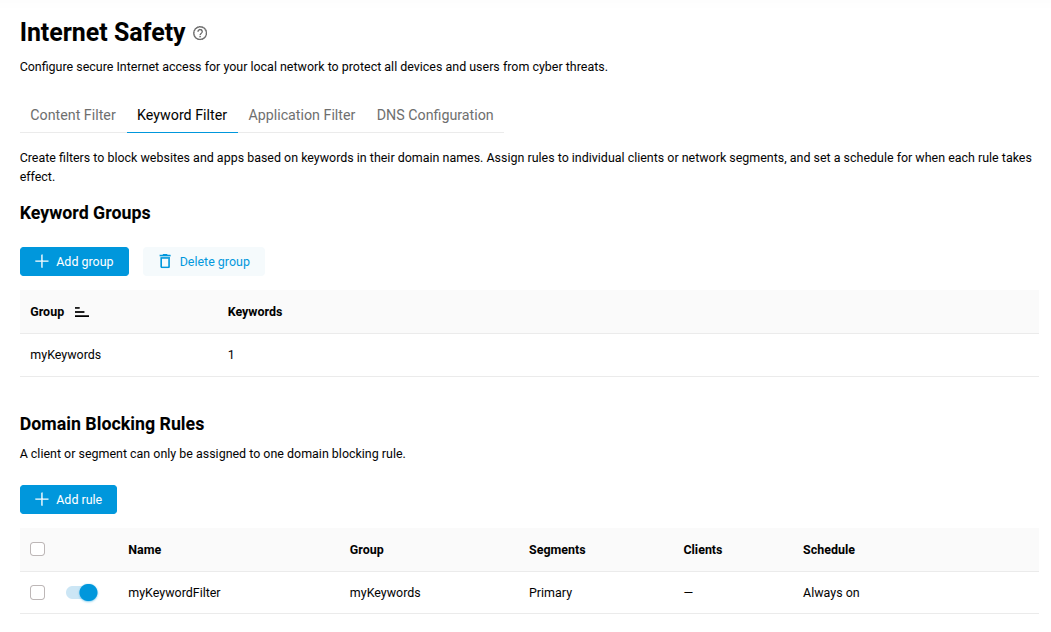
Added a Keyword Filter tab to the Internet Safety page to enable domain name blocking based on keyword groups. [NWI-4963]
Improved
Fixed
KeeneticOS 5.2 Alpha 4
07/08/2026
Improved
Fixed
KeeneticOS 5.2 Alpha 3
31/07/2026
Improved
Updated the IntelliQoS classifier to recognize the traffic of Likee application. [NDM-4586]
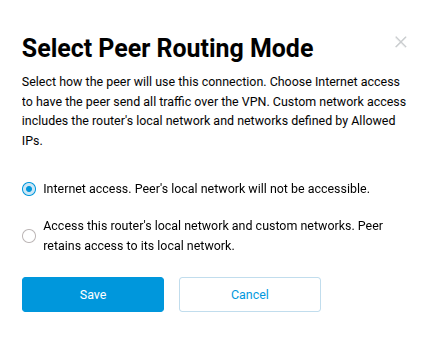
Added the Listen port setting and the client peer routing mode selection to the WireGuard VPN Server application. [NWI-4978]
Fixed
KeeneticOS 5.2 Alpha 2
24/07/2026
New
Improved
Fixed
KeeneticOS 5.2 Alpha 1
18/07/2026
New
Implemented a command to manage and assign keyword filtering profiles for domain names, available with the installation of the Domain keyword filtering system component. [NDM-4285]

ip hotspot filter (profile {name} [description {description}] [object-group {group}] [schedule {schedule}] [enable]) | (assign (interface {interface} | host {mac}) {profile})— create and manage, or assign the keyword profile to filter domain names in network traffic.
Introduced a new CLI command to assign FQDN-based routes to custom connection policies. [NDM-4423]
ip policy {name} dns-proxy route object-group {group} (({gateway} [{interface}]) | ({gateway} [{interface}]) | {interface}) [auto] [reject] | rule— add an FQDN-based route to{name}connection policy.
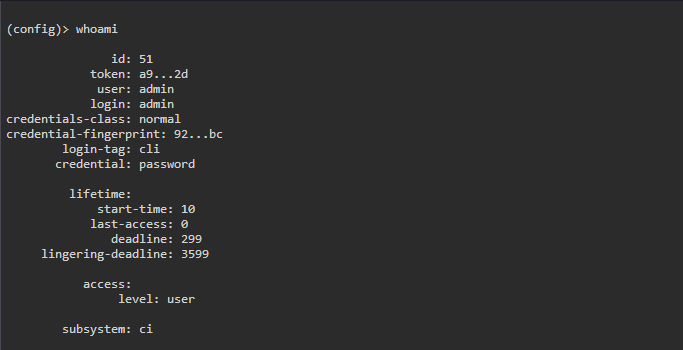
Implemented the web-based command line system shell, accessible from the right slide-out menu after installing the Browser-based Command-Line Interface system component. [NWI-4900]

Improved
Upgraded the system authentication method for the HTTP suite to harden security. [NDM-4515]
Upgraded the radvd utility to version 2.21, to support up-to-date improvements and security fixes for IPv6 operation. [NDM-4553]
Enabled post-quantum key exchange for the SSH protocol to comply with modern security standard. [NDM-4299]
Mitigated the CVE-2026-42533 vulnerability for HTTP protocol. [NDM-4566]
The following improvements have been applied to the Web Interface.
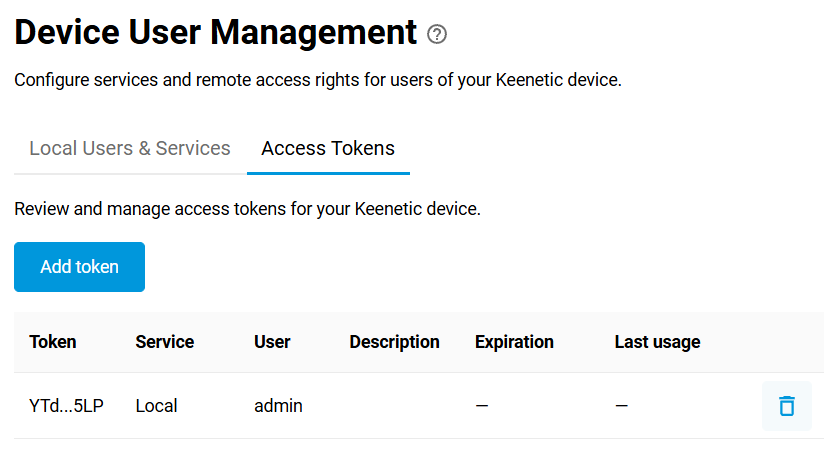
Added access tokens information display on the Users and Access page. [NWI-4923]
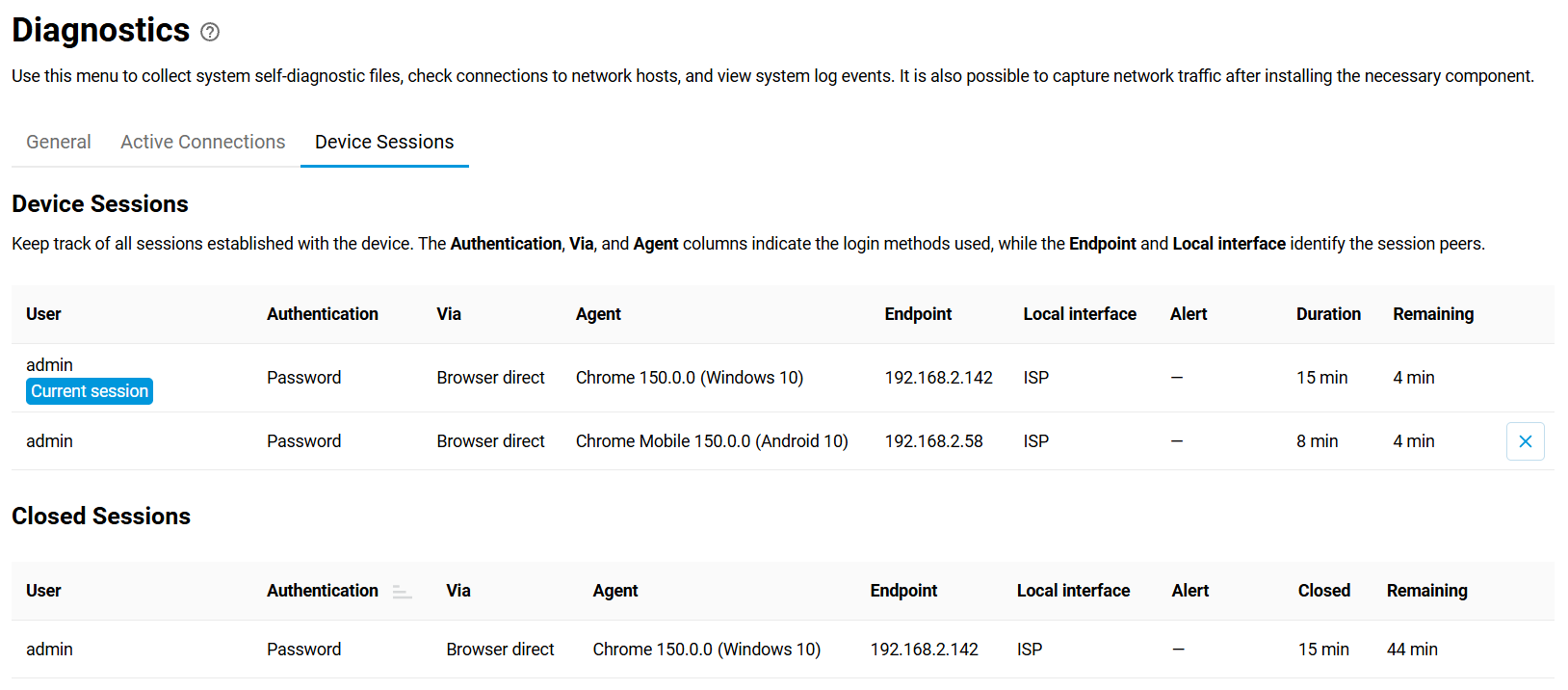
Added a dedicated tab on the Diagnostics page showing system sessions information. [NWI-4924]
Improved the Wireless Access Control page operation when no changes are made to access list. [SYS-1808]
Added support for setting the
host-uniqparameter via the CLI command to maintain compatibility with specific IPv6 connection setups. [NDM-4485] [Forum topic]interface {name} pppoe host-uniq {host-uniq}— set the HEX value to thehost-uniqparameter on the{name}PPPoE interface.
Enabled the port mapping support for CWMP management protocol over PPP connections. [NDM-4569]
Improved the Connection policy assignment procedure, reducing delays during startup and bulk operations in certain scenarios. [NDM-4540]
Enabled the inclusion of segments without an IP address on the controller node in the Wi-Fi System. [NDM-4443]
Excluded Wi-Fi System extenders from the scope of the traffic-handling rules application. [NDM-4380]
Enabled importing OpenVPN connections from a URL via CLI command. [NDM-4556]
interface {name} openvpn import {url}— set up the OpenVPN{name}interface with configuration at{URL}.
Added support for importing WireGuard configurations from a URL via CLI command. [NDM-4555]
interface {name} wireguard import {url} — set up the WireGuard
{name}interface with configuration at{URL}.