KeeneticOS 5.0
What’s new?
Welcoming the KeeneticOS next major release 5.0! This long-awaited upgrade introduces numerous enhancements to our beautiful and user-friendly web interface, along with a comprehensive list of improvements under the hood. We’ve prepared a range of new features, including a powerful DNS-based routing capability, a simple and effective WireGuard VPN server application, enhanced IPv6 support, and a smart Internet backup solution using a built-in 5G/4G modem on mesh extenders. You also get flexible and trustworthy application filtering for your home devices and VPN users, a web UI for a versatile iPerf3 speed tester, and easy eSIM management. Your router is now faster, more reliable, and more enjoyable to use and set up, whether from a PC or mobile device.
Welcome to the future of Keenetic!
Web Interface & Ease of Use:
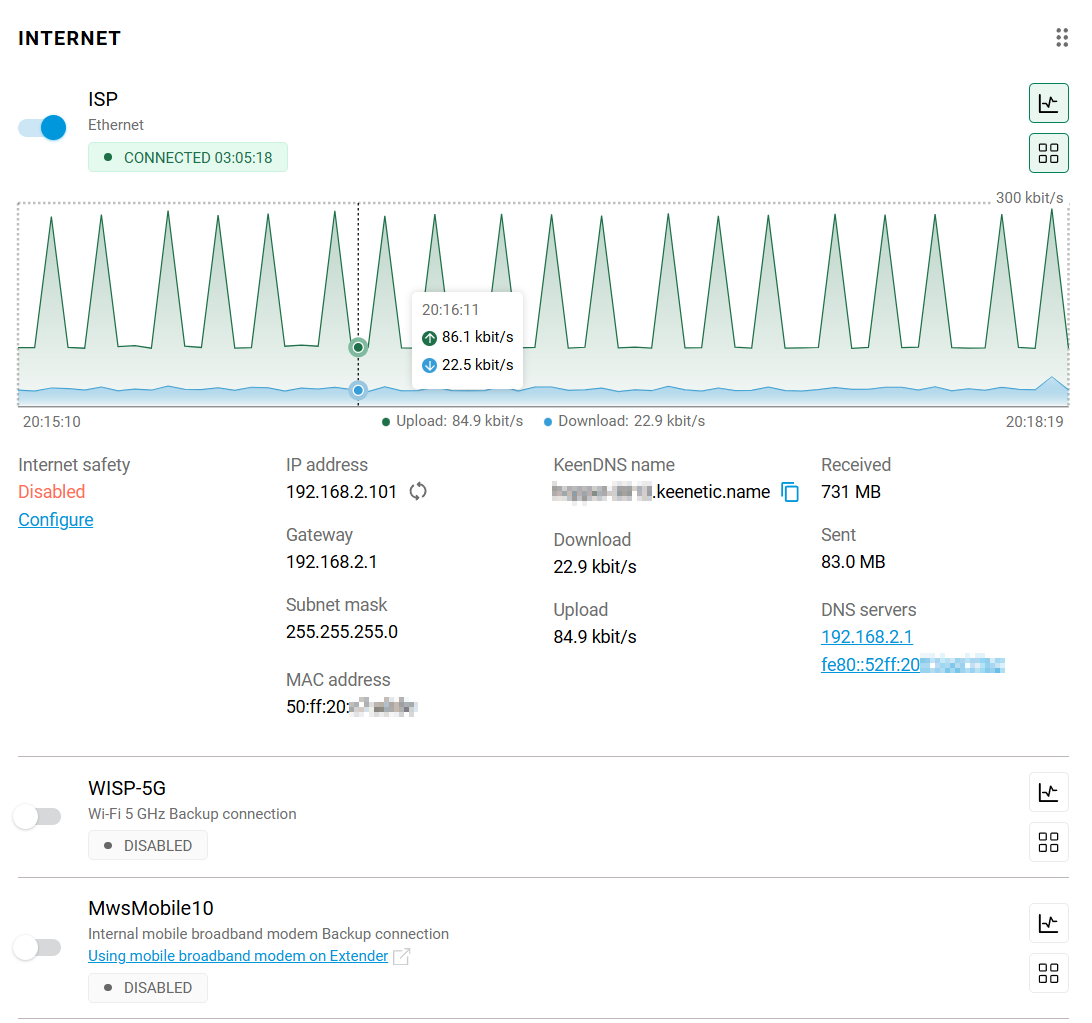
New look of the Internet card on the System Dashboard page. The updated design and functionality make it easier to read and monitor traffic stats, providing a cleaner and more intuitive interface.
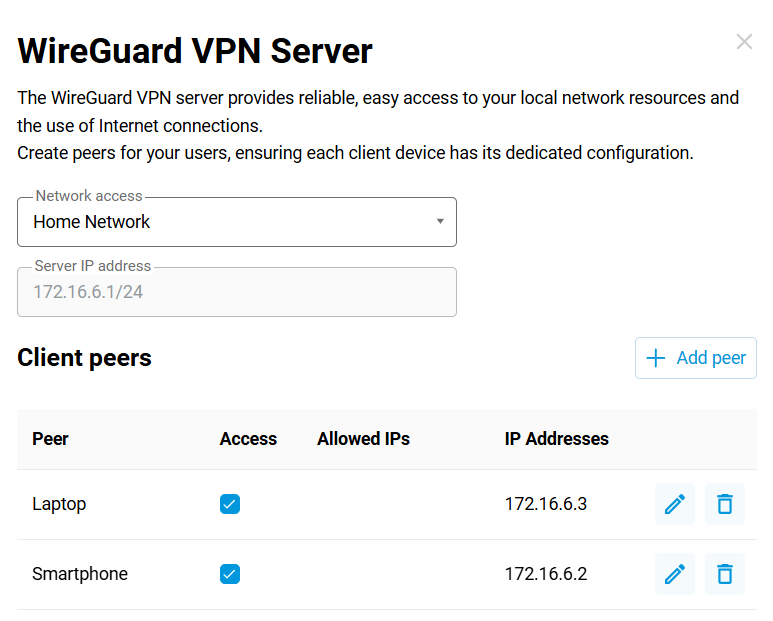
Keenetic now features the WireGuard VPN Server application — a modern, high-performance VPN solution for secure remote access to the home network using any client. Administrators create and manage peers directly from the web interface, automatically generating configuration files and QR codes for instant connection.
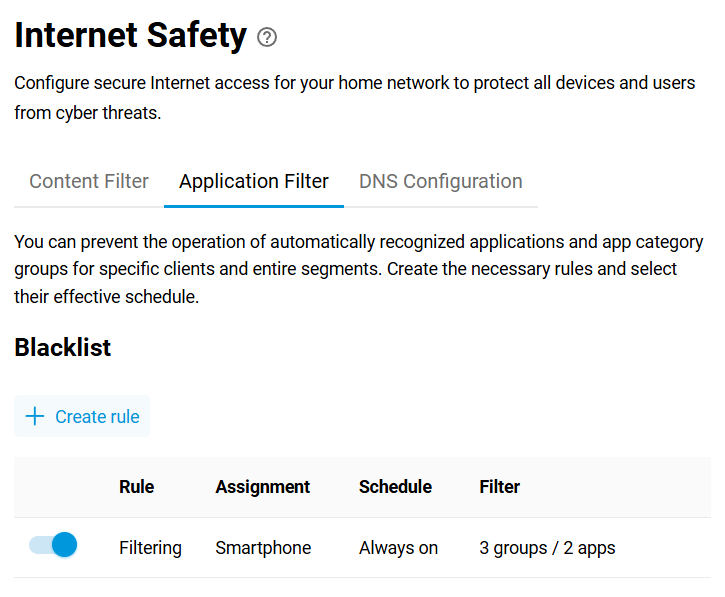
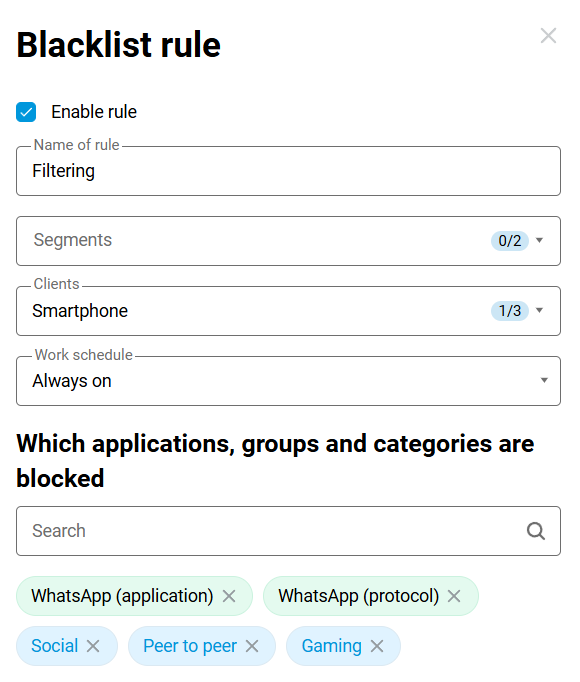
The new Application Filter tab on the Internet Safety page allows you to easily block specific apps or traffic categories (like social media, games, or streaming) for individual devices and home networks — such as your kids’ Wi-Fi.
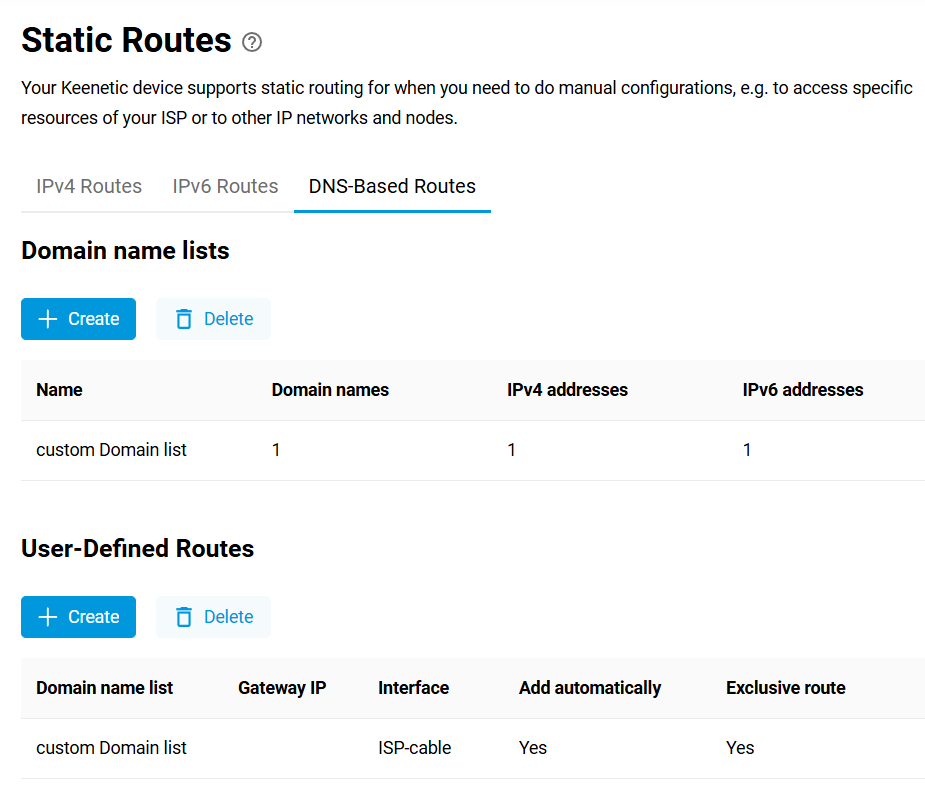
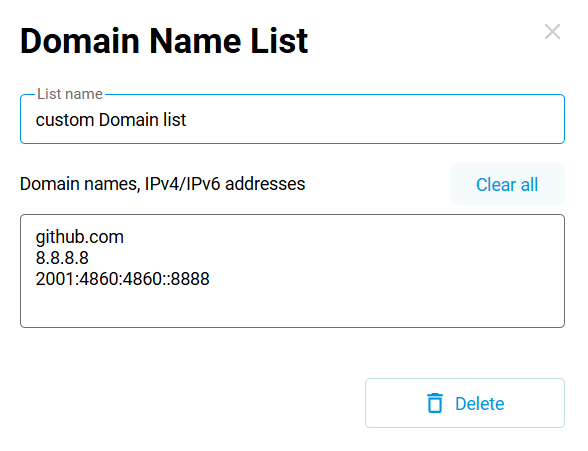
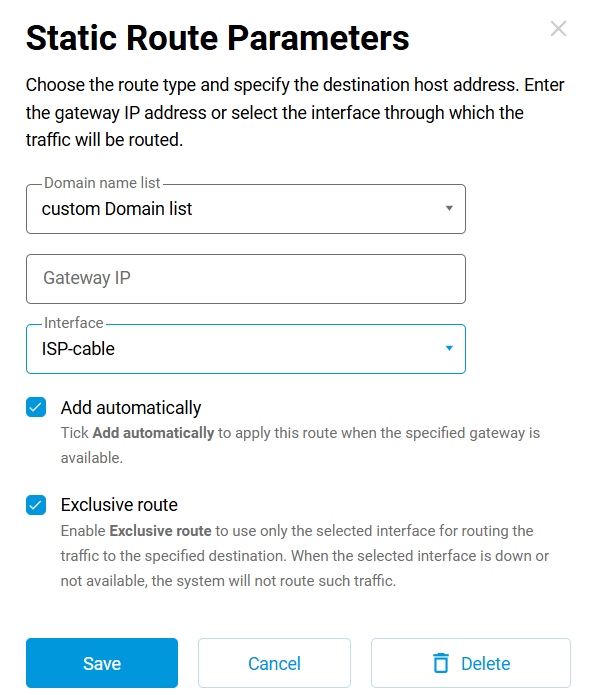
The Routing page enhancement introduces a convenient DNS-Based Routes tab, an instrument that’s especially useful for tasks such as directing business applications through a corporate connection or ensuring the streaming services utilize a faster link. It works by setting up custom routing rules for traffic destined to specific domains or IP addresses to pass over the connection or gateway of your choice.
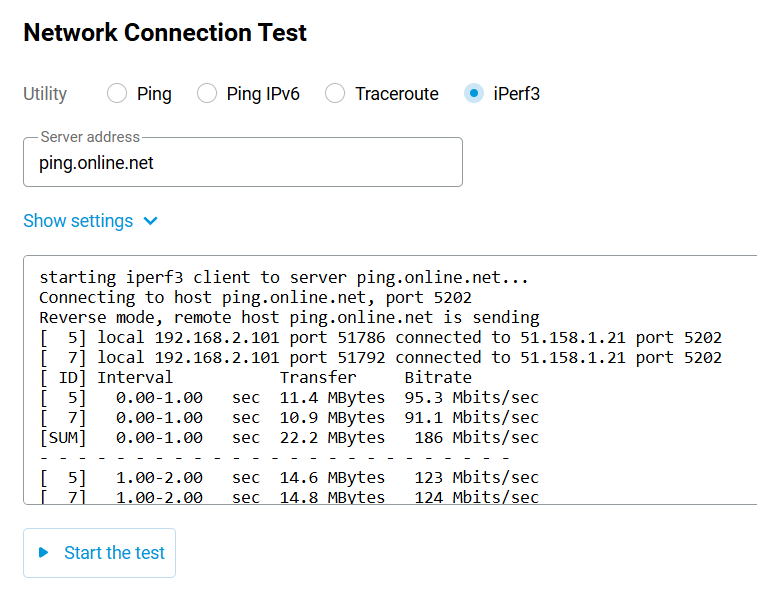
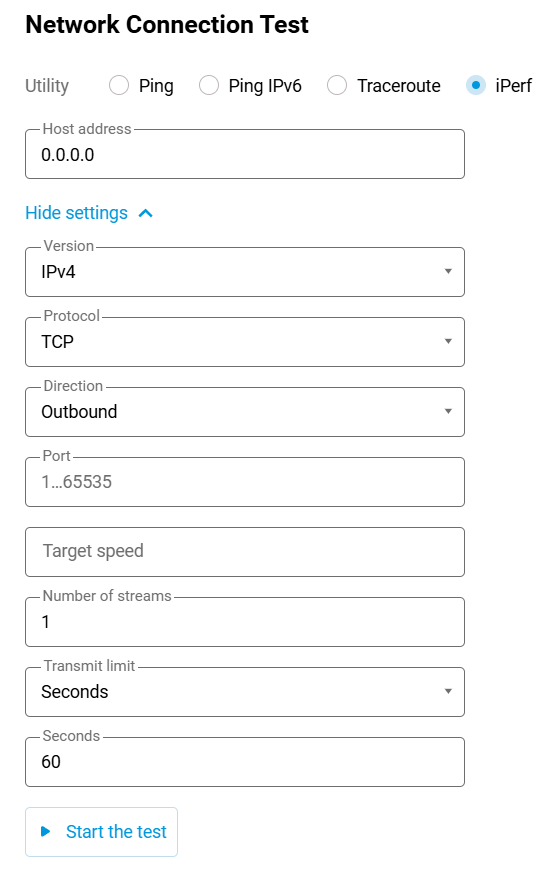
The Diagnostics page now features an iPerf3 tool in the Network Connection Test section, allowing you to measure bandwidth and network performance directly from the web interface. To get started, install the iPerf3 system component on your device.
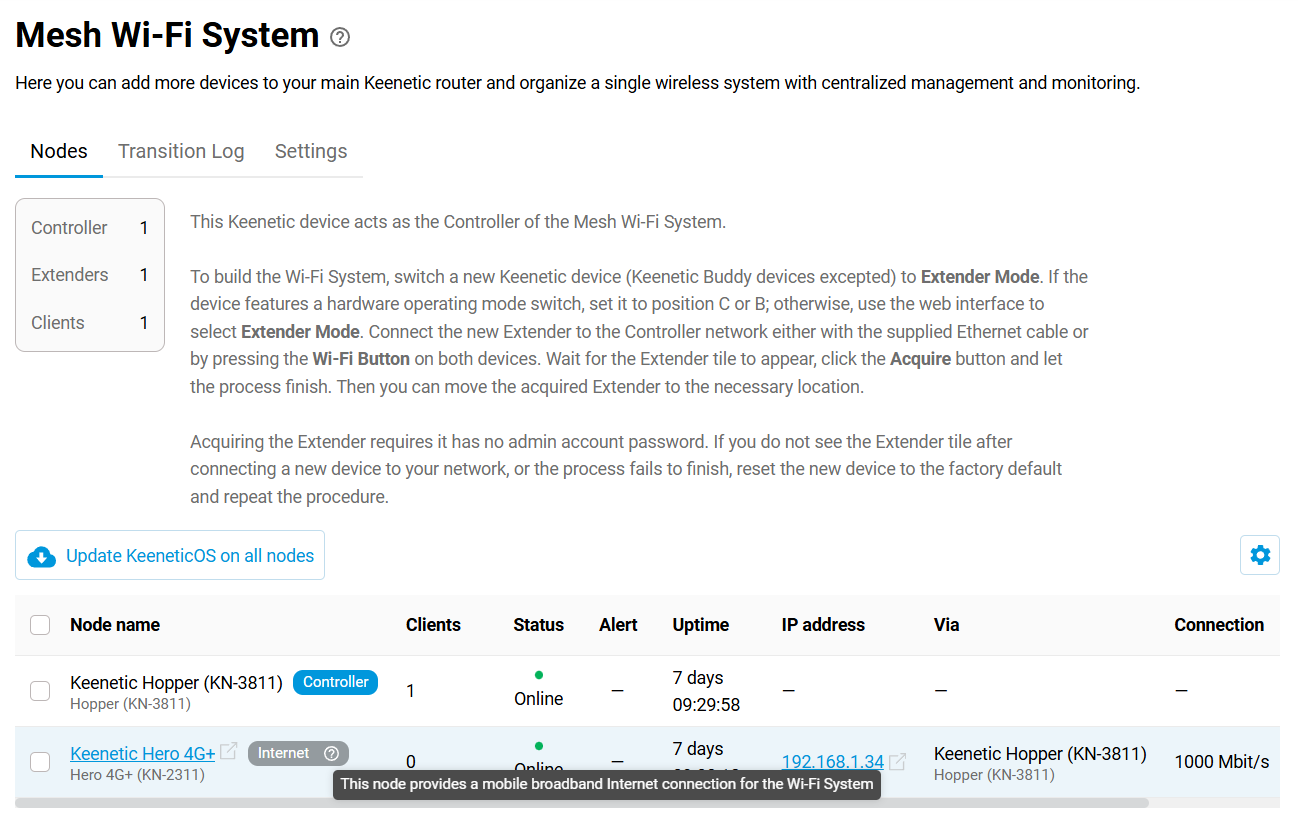
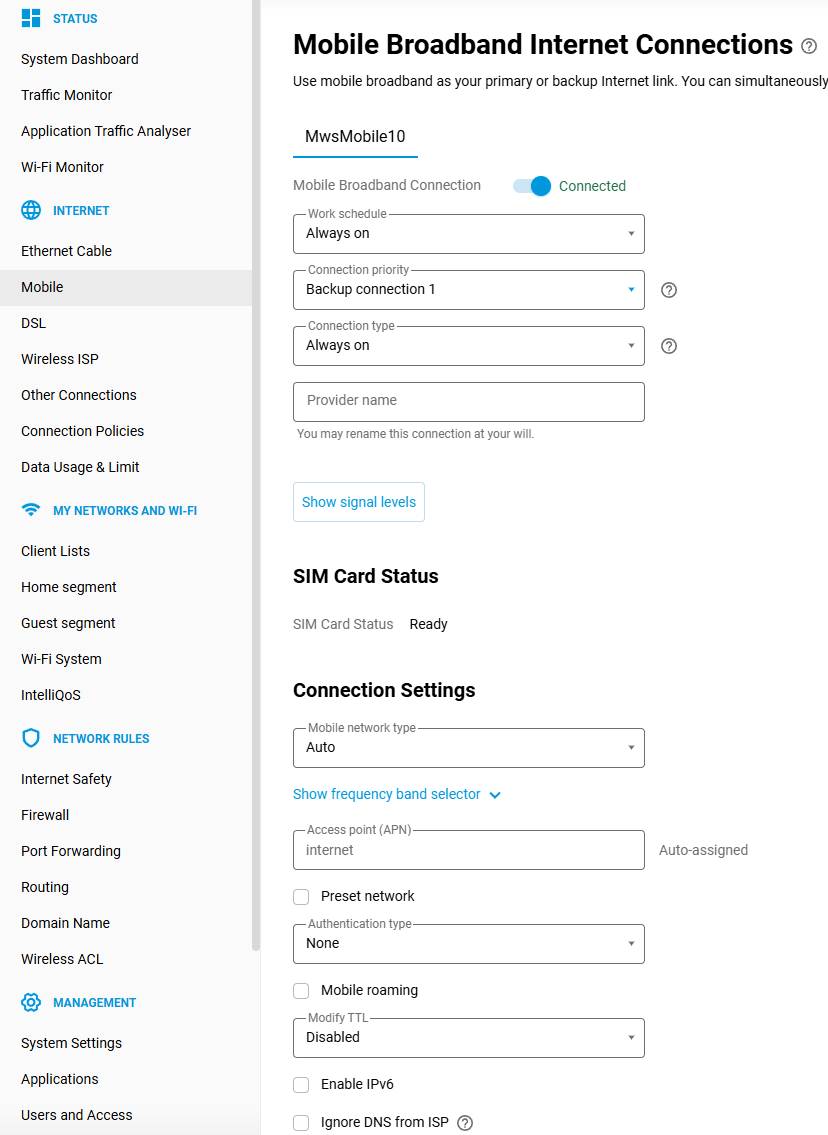
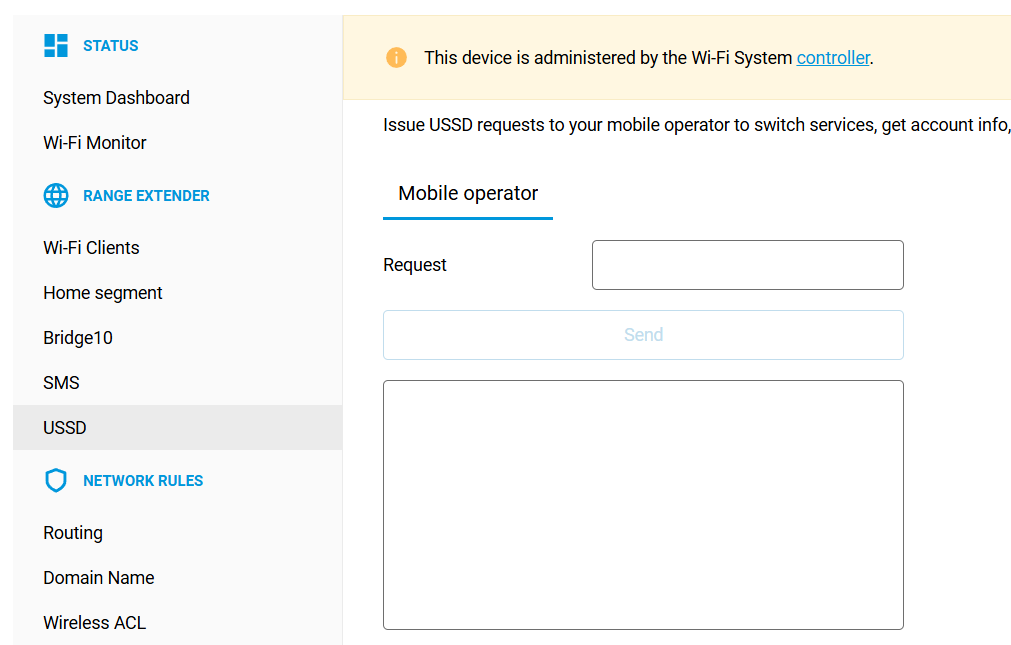
The Mesh Wi-Fi System upgrade to support seamless use of an Extender’s built-in mobile network modem as either your primary or backup Internet connection. The Controller automatically creates a dedicated
MwsMobileinterface and manages it like any other WAN option. Modem’s SMS and USSD tools are accessible as well, via an Extender’s web interface, which you can open directly from the Wi-Fi System page.
Alert pop-ups got a makeover! They are now more readable and visually appealing, contributing to consistency throughout the entire interface.
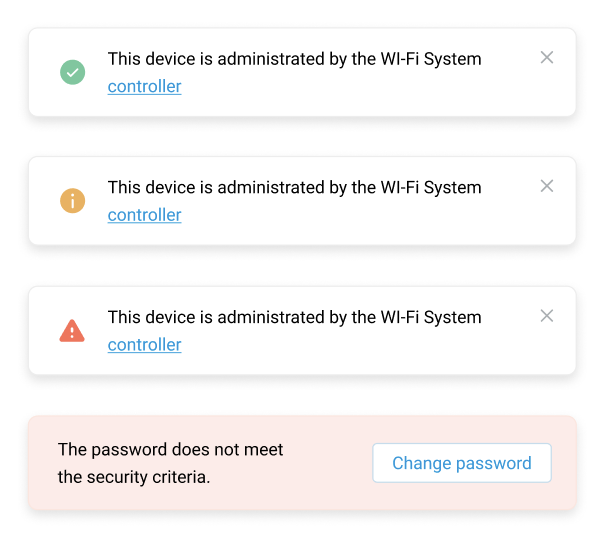
Automatic light/dark colour scheme — the web interface can now follow the theme of your browser or device.
We’re introducing a new wave of IPv6 enhancements to make your network more flexible and adaptable.
Port Forwarding now supports IPv6 Pinholing, enabling smooth external access for IPv6-based clients.
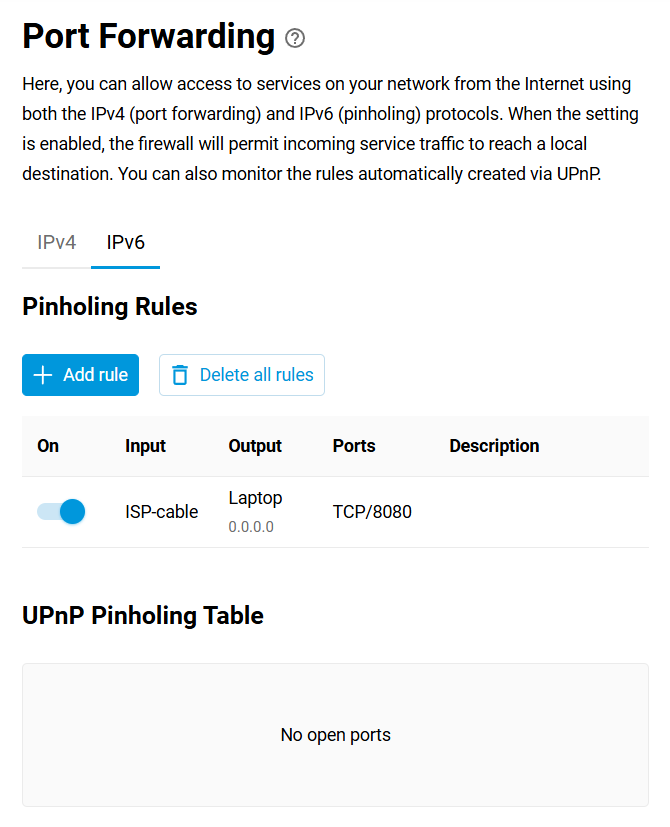
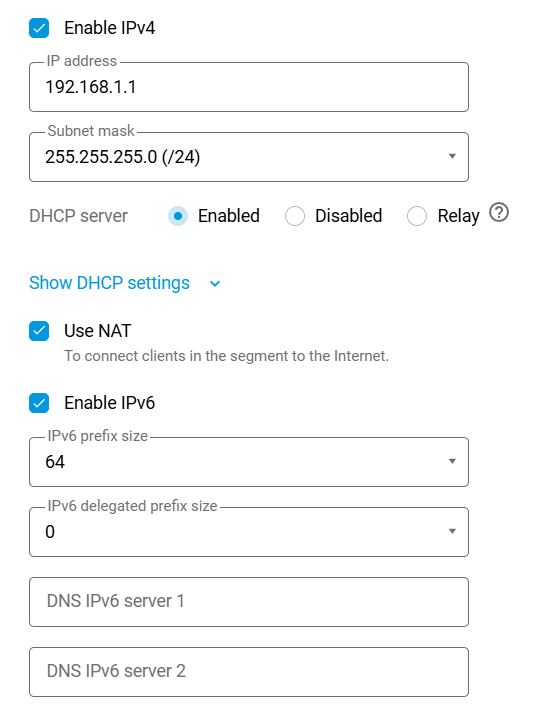
Each local network segment now has an Enable IPv6 control, along with relevant advanced configuration options.
KeenDNS service now features uniform IPv4/IPv6 support, offering direct IPv6 access over the device’s domain name.
UPnP (IGDv2 PCP protocol) now supports IPv6 as well — games and apps will open the necessary ports automatically.
Network & Advanced Features:
A
Dummyvirtual interface is now available for routing tests and experimental setups.Virtual Router Redundancy Protocol (VRRP v2/v3) support for backup routers. The VRRP enables automatic redundancy between master and backup routers, ensuring the deployment of stable and reliable connections.
A new Limited rights admin (
manager) role with a privilege level that allows restricted permissions is ideal for devices maintained by ISPs.The import/export operation for static routes now preserves your comments, so the file remains readable by humans.
WAN Ethernet ports now accept VLAN tagging with ID 0 — a setting required by some ISPs, and it finally works.
Security Improvements:
Update of the kernel and internal OS services closes freshly discovered CVE vulnerabilities.
Public web access is blocked if the device administrator password is weak.
The system prevents users with read-only access from viewing sensitive data.
We greatly appreciate your continued support and engagement. Your feedback helps us make Keenetic even better. For any questions, discussions, issue reporting, or contacting our development team, please visit our forum. Thank you for choosing Keenetic!
KeeneticOS 5.0.10
15/04/2026
Improved
Upgraded the OpenSSL library to versions 3.5.6 and 3.0.20 to address multiple security vulnerabilities, including CVE-2026-28386, CVE-2026-28387, CVE-2026-28388, CVE-2026-28389, CVE-2026-28390, CVE-2026-31789, CVE-2026-31790. [NDM-4402]
Fixed
Corrected the display of the storage icon in the Web Interface at certain screen resolutions. [NWI-4693]
KeeneticOS 5.0.9
08/04/2026
New
Added a Web Interface control to turn off the WireGuard peer in the Connect via selector. [NWI-4756]
Improved
Addressed the CVE-2026-28753 security vulnerability in the Web Interface service. [NDM-4368]
Fixed
The following fixes have been applied to the Web Interface.
Fixed the appearance of the logo in the Web Interface header. [NWI-4771]
Resolved the scrolling issue on the Application Traffic Analyser page for mobile view. [NWI-4726]
Removed the state display for toggles on the General System Settings page. [NWI-4742]
Updated the link to the Active Connections section in Diagnostics from the System Dashboard. [NWI-4743]
Added sorting by name and traffic transmitted to the WireGuard connections list. [NWI-4732]
Fixed the charts display on the Traffic Monitor page. [NWI-4758]
Fixed the 802.1q egress priority setting for packets with a non-zero DSCP mark. [NDM-4342]
Resolved the issue that caused
VLAN ID is busylog messages to appear when adding network segments. [NDM-4363]Fixed a memory leak in the IPv6 addresses and prefixes API parser. [NDM-4376]
Fixed the issue that caused an incorrect
403 Forbiddenstatus when accessing the KeenDNS device name via IPv6 in Cloud access mode. [NDM-4378]Corrected the packet format for WS-Discovery
ProbeandHellomessages to fix the reboot issue with NETSurveillance video cameras. [NDM-4387]
KeeneticOS 5.0.8
19/03/2026
Improved
Improved the operation of the Port Forwarding rule management buttons in the mobile view of the registered client settings in the Web Interface. [NWI-4672]
Confined WS-Discovery
Hellomessages by theBridge0interface (Home network) by default. [NDM-4314]
Fixed
The following fixes have been applied to the Web Interface.
Corrected the configuration of the management port number. [NWI-4747]
Corrected the sorting of clients by IP address on the Client Lists page in the Web Interface. [NWI-4677]
Corrected the free SMS memory display for certain 5G/4G modem models. [NWI-4692]
Fixed the on-hover display for the cog icon on the System Dashboard when using the Dark theme. [NWI-4712]
Fixed the automatic update of the active connections display on the Diagnostics page. [NWI-4713]
Corrected the language set reset upon OS manual update. [NWI-4703]
Fixed the tooltip display at the right edge of the Wi-Fi Monitor graph for wider screens. [NWI-4717]
Minimized unnecessary polling of the Captive Portal service when accessing home network settings pages. [NWI-4368]
Adjusted the parameters of the WS-Discovery
Hellomessage to fix a reboot issue with certain IP cameras. [NDM-4331]Resolved an issue where blocking of the IPsec inter-process communication (IPC) socket could cause the Web Interface to freeze. [NDM-4332]
Corrected the session flushing to ensure it complies with the DNS-based routing. [NDM-4336]
KeeneticOS 5.0.7
26/02/2026
New
Implemented CLI commands to turn off the SSDP and WS-Discovery network host discovery methods. [NDM-4283]
interface {name} ssdp disable— turn off the Simple Service Discovery Protocol discovery on interface{name};interface {name} wsd disable— turn off the Web Services Dynamic Discovery device locator on interface{name}.
Improved
The following improvements have been applied to the Web Interface.
Improved the line wrapping for the mobile view of the System Log popup in the Web Interface. [NWI-4680]
Added support for IPv6 URIs when configuring DNS-over-TLS (DoT) and DNS-over-HTTPS (DoH) secure DNS servers, such as
https://[2606:4700:4700::1111]:80/dns-query. [NWI-4610]Improved toggle state indication. [NWI-4661]
Added the DuckDNS preset to the Domain Name → DDNS page. [NDM-4273]
Enhanced the process for renewing the SSL certificate for the system domain name. [NDM-4284]
Fixed
Fixed the issue with the connection information display for wired client devices in the Wi-Fi System. [NDM-4282]
The following fixes have been applied to the Web Interface.
Fixed the tooltip display in the Proxy Connections list. [NWI-4670]
Fixed the sorting mode icon display in the Content Filter settings. [NWI-4671]
Fixed the activation of toggles for the mobile view. [NWI-4632]
Fixed the shortening of client names on the Client Lists page. [NWI-4668]
Eliminated security vulnerabilities: CVE-2014-3570 and CVE-2022-4304. [SYS-1542]
KeeneticOS 5.0.6
11/02/2026
Improved
The improved extender discovery method employs both L2 (LLDP) and L3 (multicast WS-Discovery) protocols to support specific configurations of managed Ethernet switches for your Wi-Fi System. [NDM-4220]
Fixed
The following fixes have been applied to the Web Interface.
Corrected the display of wired clients connecting through Wi-Fi System extenders. [NWI-4667]
Fixed the filtering by client name on the Transition Log tab for cases where the name includes spaces. [NWI-4616]
Fixed the radio button operation in the Wi-Fi Bands Open for Connection section of the client settings. [NWI-4630]
Fixed the cause of the
response is too bigerror message appearing in the the Wi-Fi System Controller system log. [NDM-4250]Fixed the mobile data packet loss when polling the SMS subsystem of the built-in modem. [NDM-4244]
Eliminated a security vulnerability (CVE-2026-1642) in the Web Interface service. [NDM-4267]
Resolved an issue where the KeenDNS name was inaccessible to clients on the home network after switching the service from Cloud to Direct mode. [NDM-4255]
KeeneticOS 5.0.5
28/01/2026
Fixed
An issue with KeenDNS domain name resolution in direct access operating mode for the IPv6 protocol has been fixed. [NDM-4136]
The following fixes have been applied to the Web Interface.
Resolved an issue that caused the
Captive portal profiles not received. No connection to the server.error to occur when enabling the Captive Portal and selecting certain profiles. [NWI-4611]
Fixed clearing cached sessions when restarting the WireGuard connection used to access the Internet. [NDM-4225]
Fixed the UPnP service compatibility issue with Synology ® NAS. [NDM-4247]
KeeneticOS 5.0.4
16/01/2026
Improved
Added sorting by list name in the Domain Name Lists summary table on the Routing → DNS-Based Routing tab. [NWI-4595]
Upgraded GnuTLS to
v3.8.11, resolving the following CVE security issues. [NDM-4205]Optimized memory consumption in the Traffic classification engine system component. [NDM-4219]
Fixed
Fixed a Web Interface issue where saving the network segment configuration unnecessarily required specifying a VLAN ID. [NWI-4578]
Resolved an issue where static routes added after the default route did not appear in the routing table. [NDM-4209]
Fixed loss of access to the Web Interface caused by network discovery service timeouts under certain conditions. [NDM-4223]
Resolved an issue with the Simple Service Discovery Protocol (SSDP) network discovery routine that could lead to a system restart under certain conditions. [NDM-4224]
KeeneticOS 5.0.3
18/12/2025
Improved
Corrected the visibility of the Mobile menu in the Web Interface when no USB modem is connected or no Wi-Fi System Extender with a built-in 4G/5G modem is present. [NWI-4518]
Optimized the performance of FQDN routing list updates. [NDM-4197]
Fixed
Resolved a system restart loop that occurred when the Fail-Safe Configuration Mode was enabled while a ZeroTier connection was running. [NDM-4187]
Fixed the UDP-to-HTTP proxy (
udpxy) service crash when running on aBridgepublic interface. [NDM-4200]Fixed the operation of the wireless 2.4 GHz backhaul connection. [SYS-1513]
Fixed the FQDN-based routing when DNS is operating over the TCP protocol. [NDM-4201]
KeeneticOS 5.0.2
05/12/2025
New
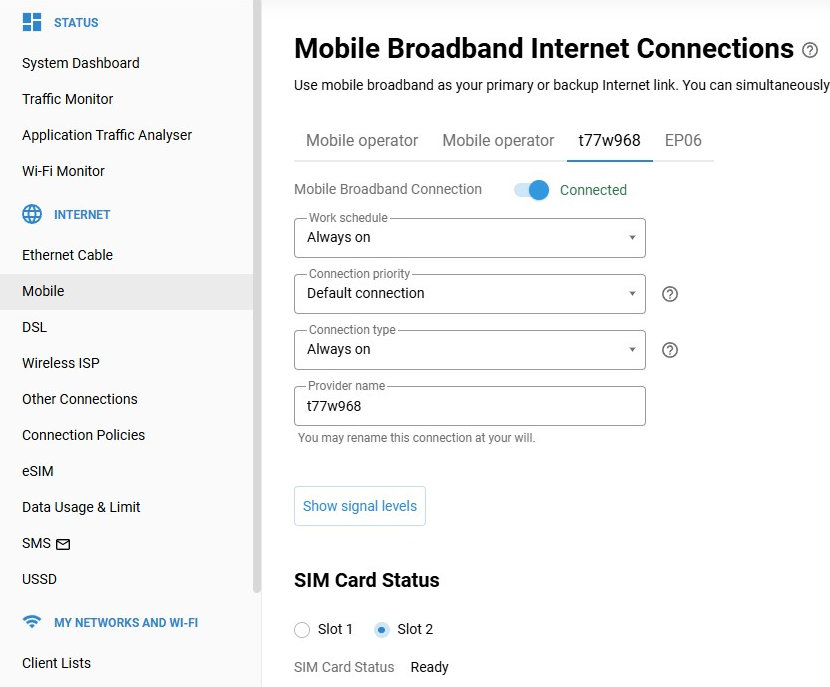
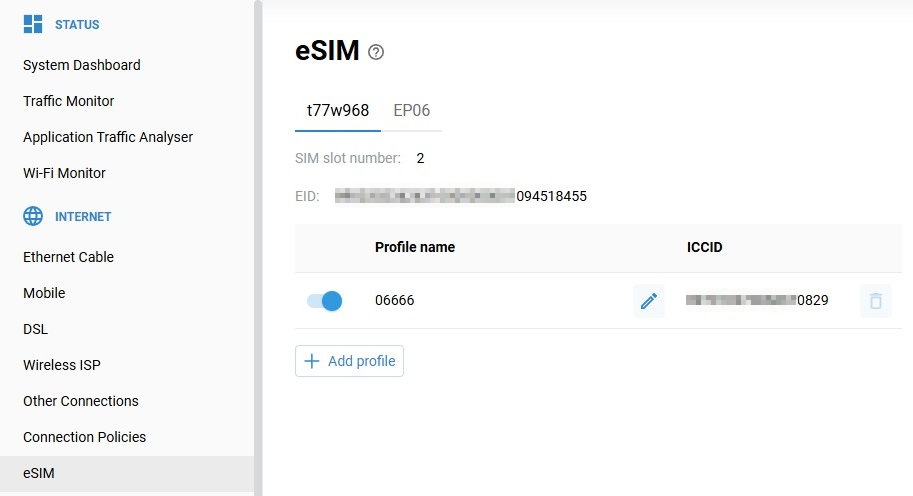
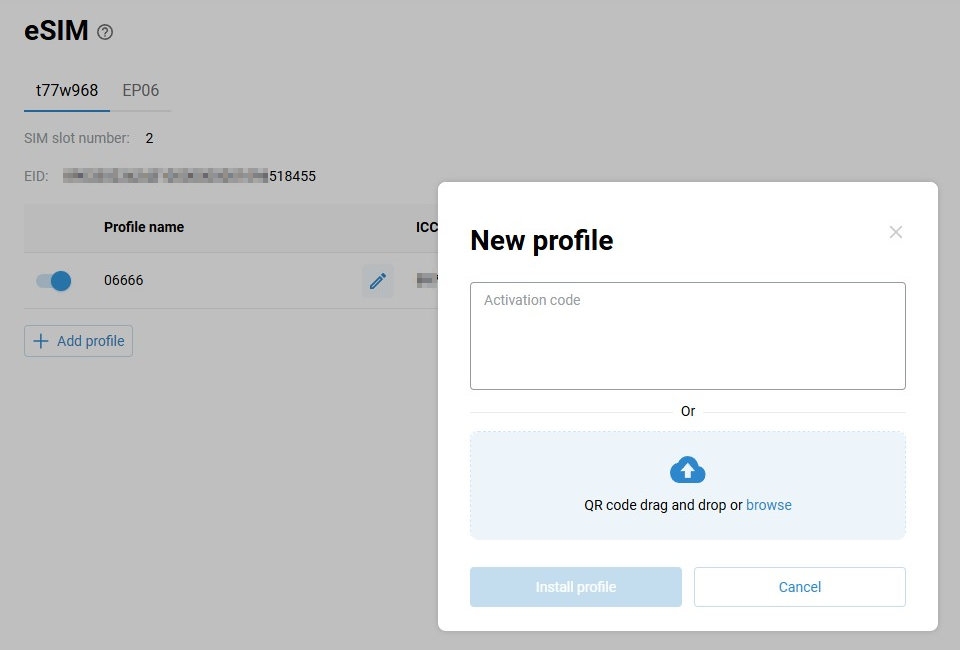
A new eSIM management page has been added to the Web Interface, allowing you to easily view, add, switch, and manage eSIM profiles on supported 5G/4G modems. The feature currently works with external eSIM modules accessed via a physical eSIM card, so you can activate mobile operators, change data plans, or manage multiple profiles directly from your browser without needing additional apps or manual configuration. [NWI-4526]
Added a new
source-addressparameter to thetools iperf3CLI command, providing control over the client source IP address used during performance testing. [NDM-4176]tools iperf3 {host} [(ipv4 | ipv6)] [(tcp | udp)] [reverse] [port {port}] [bitrate {bitrate}] [streams {streams}] [(time {time}) | (bytes {bytes})] [(source-interface {source-interface}) | (source-address {source-address})]
Improved
The following improvements have been applied to the Web Interface.
Updated the Transition Log tab display for mobile screens. [NWI-4549]
Removed the unnecessary reduction of the description text on the Fail-Safe Configuration Mode pop-up. [NWI-4554]
Fixed
The following fixes have been applied to the Web Interface.
Fixed the display of the Enable SNTP service checkbox. [NWI-4561]
Resolved an issue where users with
managerprivileges received an unexpectedcomponents list: execute deniederror message. [NWI-4532]
Fixed the parsing of
ipv6 staticCLI commands that contain a description field. [NDM-4098]Fixed an issue that caused the
stubby: Could not parse config fileerror when using DNS over TLS (DoT) for address resolution under certain conditions. [NDM-4125]Addressed a potential system restart triggered by
DNS FQDN event sinkthreads. [NDM-4162]Restricted access to sensitive data for users with
readonlyprivileges, enhancing security and ensuring compliance with privilege levels. [NDM-4169]Fixed the improper missing password warning when navigating to the web interface of a Wi-Fi System extender via Remote Monitoring and Management (RMM). [NDM-4170]
KeeneticOS 5.0.1
14/11/2025
Improved
The following improvements have been applied to the Web Interface.
Redesigned alert pop-ups in the Web Interface for clearer interaction, better readability and a more consistent visual style. [NWI-4469]

Improved detection and error messaging for outdated browsers when opening the Web Interface. [NWI-4273]
Implemented the configuration of routes over different gateways or interfaces for the same FQDN object group using the command-line interface (
dns-proxy route object-group). Routes are prioritized in input order. [NDM-4118]
Fixed
The following fixes have been applied to the Web Interface.
Addressed an issue where the Total Traffic legend was not displayed correctly for application categories on the Traffic Monitor page. [NWI-4508]
Corrected the layout of the DNS-Based Routes tab on the Routing page when opening a Domain Name Lists entry. [NWI-4509]
Corrected the bottom margin spacing in the Signal Levels pop-up. [NWI-4511]
Fixed the incorrect Transit requests allowed status on the DNS Configuration page in mobile view. [NWI-4512]
Corrected validation issues in the iPerf3 network connection test utility on the Diagnostics page. [NWI-4466]
Fixed the WireGuard connection settings saving. [NWI-4533]
Fixed the IPv4 default route setup for IPv6 DS-Lite over PPPoE connections. [NDM-4109]
Fixed the command execution restriction for users with read-only privileges. [NDM-4113]
Fixed the issue with user authentication for logging into the Web Interface using IPv6. [NDM-4115]
KeeneticOS 5.0.0
29/10/2025
Improved
The following improvements have been applied to the Web Interface.
Added an option to select an underlying connection in the Peer settings for WireGuard. [NWI-3819]
Added the Throughput graph and Information button tooltips to the Internet card. [NWI-4461]
Changed the
NXDOMAINDNS response toNOERRORwhen querying AAAA records for A-only entries, in accordance with RFC 6147. [NDM-3857]The OpenSSL library has been updated to version
3.0.18. [NDM-4083]Changed the packet dump file extension from
.pcapngto.pcapin the Packet Capture system component. [NDM-4091]Implemented safeguards to prevent routing loops when a remote peer sends an invalid IPCP configuration. [NDM-4093]
Devices with weak administrator passwords no longer allow public access to the Web Interface. [NDM-4097]
Fixed
The following fixes have been applied to the Web Interface.
Resolved an issue where toggle switches did not work on the Other Connections page. [NWI-4452]
Resolved an issue where tooltips did not display correctly on the Wi-Fi Monitor page. [NWI-4449]
Fixed the upper border display on the Internet card. [NWI-4460]
Fixed incorrect Internet Safety status on the Internet card when the Cloud-based content filtering and ad blocking component is not installed. [NWI-4462]
Fixed QR code generation for hidden Wi-Fi networks on the My Networks and Wi-Fi card. [NWI-4468]
Fixed the Wi-Fi button so it correctly turns Guest network access points off and back on in certain scenarios. [NDM-4054]
Resolved an issue where KeenDNS names failed to resolve for VPN clients. [NDM-4095]
Resolved an issue where the
autoargument was parsed incorrectly in DNS-Based Routes configuration. [NDM-4096]Fixed an issue where adding FQDN object group exclusions generated an
IPset kernel errorin the System Log. [NDM-4101]
KeeneticOS 5.0 Beta 3
10/10/2025
New
Implemented a CLI option to override the DNS server for clients of the built-in VPN servers. [NDM-4032]
crypto map virtual-ip dns-servers {dns1} [dns2]— add DNS servers for clients of the IKEv1/IPsec VPN Server and IKEv2/IPsec VPN Server applications;crypto map l2tp-server dns-servers {dns1} [dns2]— add DNS servers for clients of the L2TP/IPsec VPN Server application;sstp-server dns-servers {dns1} [dns2]— add DNS servers for clients of the SSTP VPN Server application;vpn-server dns-servers {dns1} [dns2]— add DNS servers for clients of the PPTP VPN Server application;oc-server dns-servers {dns1} [dns2]— add DNS servers for clients of the OpenConnect VPN Server application.
Improved
Added support for including IP subnets in the Domain Name Lists, using the
object-group fqdn includecommand in the CLI or via the DNS-Based Routes tab on the Routing page. [NDM-4078]Command example:
object-group fqdn TEST include 10.0.0.1/24Adjusted the intensity of recurring name resolutions for the currently unclaimed names in the FQDN Object group (
object-group fqdn). [NDM-4082]Enabled external access to the IPv6 addresses of backup WAN connections. [NDM-4067]
Fixed
Fixed an issue that caused multiple
Dns::Route::ResolveQueuemessages to appear in the System Log when using FQDN object groups with many entries. [NDM-4086]The following fixes have been applied to the Web Interface.
Fixed an issue where the hint button icon shifted position on mobile screens, including on certain elements. [NWI-4447]
Corrected the display of each application’s Blacklist status on the Application Traffic Analyser page. [NDM-4051]
Fixed the display of the WireGuard VPN Server Statistics pop-up. [NWI-4425]
Fixed the blocking of Wireless Network toggles in network segment settings on Mesh Wi-Fi System extenders. [NWI-4450]
Fixed an issue with the display of drop-down lists on mobile screens. [NWI-4448]
Fixed the display of
TunnelSixInFourinterfaces when editing static routes. [NWI-4456]
Resolved an issue with L2TP traffic handling when the L2TP/IPsec VPN Server application is enabled. [NDM-4068]
Resolved an issue with forwarding
servfail.invalidDNS queries to upstream DNS servers. [NDM-4069]Fixed an issue that could cause the system to crash when connecting clients using Wi-Fi OWE (Opportunistic Wireless Encryption) authentication. [SYS-1461]
Fixed an issue on the Routing page that prevented disabling individual static route entries without affecting others. [NDM-4076]
KeeneticOS 5.0 Beta 2
26/09/2025
New
Implemented a new Enable IPv6 checkbox and an IPv6 configuration section for Home and additional local network segments, providing advanced control over IPv6 parameters and allowing IPv6 to be disabled per segment. [NWI-4373]

Introduced a new design for the Internet card on the System Dashboard page, featuring an updated layout and buttons to manage the display of connection statistics and traffic chart blocks. [NWI-4377]

Improved
The following improvements have been applied to the Web Interface.
The KeenDNS tab on the Domain Name page now features a single checkbox to enable both IPv6 and IPv4, simplifying setup and improving dual-stack compatibility. Added support for direct access via the IPv6 protocol and fixed an issue with incorrectly processed KeenDNS mode configurations. [NWI-4427]
Added support for USSD requests starting with
#, improving correct processing of these commands. [NWI-4401]Improved the naming of WireGuard VPN Server client peer configuration files for better compatibility with the official WireGuard® application. [NWI-4424]
Added Basic authentication support for the OpenConnect VPN client via the command line interface (CLI). [NDM-4037]
interface {name} openconnect allow-basic-auth— enable the basic authentication for the{name}OpenConnect connection.
Fixed
The following fixes have been applied to the Web Interface.
Corrected parameter validation in the iPerf3 network connection test utility on the Diagnostics page. [NWI-4402]
Corrected sorting for the Profile column on the Content Filter tab of the Internet Safety page and the Ports column on the Port Forwarding page. [NWI-4386]
Corrected the layout when printing Wi-Fi connection information from the My Networks and Wi-Fi card on the System Dashboard page. [NWI-4387]
Fixed the DNS profile editing issue when the Cloud-based content filtering and ad blocking component was not installed. [NWI-4396]
Fixed the incorrect display of the Interface selector when editing Routing Rules on the DNS-based Routes tab. [NWI-4405]
Fixed the issue where Wi-Fi access points from a deleted segment were still displayed on the Firewall tab. [NWI-4407]
Fixed several configuration issues related to user-defined routes in the Routing page. [NWI-4428]
Resolved an issue where the
DNS proxyservice could enter a busy loop when processing malformed DNS responses, improving stability and performance. [NDM-4034]Fixed an issue with the Exclusive Route option in DNS-based Routes. [NDM-4046]
Fixed inbound Web Interface access via IPv6 on interfaces configured with the
privateorprotectedsecurity level. [NDM-4061]Fixed the display of remote IP addresses and ports for clients in the WireGuard VPN Server Statistics popup window. [NDM-4064]
KeeneticOS 5.0 Beta 1
11/09/2025
New
Further improvements to the Mesh Wi-Fi System allow an Extender’s built-in 4G/3G modem to be used as the primary or a backup Internet connection. When a compatible Extender is detected, the Controller automatically creates a dedicated
MwsMobileinterface and manages the connection like any other, including its use in Connection Policies. SMS and USSD modem options are available directly in the Extender’s Web Interface, which can be opened via a link on the Controller’s Wi-Fi System page. [NDM-4027]

The Port Forwarding page now supports IPv6 Pinholing, letting you open TCP and UDP ports to provide external access from the Internet to devices on your home network that use IPv6 addresses. [NWI-4213]

Added support for the Virtual Router Redundancy Protocol (VRRP) v2 and v3, configurable via the command line interface (CLI). This enables redundant routing across multiple routers. To use it, install the VRRP support system component. [SYS-1443]
interface {name} vrrp group {group} ip {ip}— set virtual IP address for the group;interface {name} vrrp group {group} priority {priority}— set priority (integer in the range 0 to 255), the device with the numerically highest priority becomes the master in the group;interface {name} vrrp group {group} advertise {advertise}— set advertisement interval in seconds (integer in the range 1 to 255, the default is 1);interface {name} vrrp version {version}— set protocol version, supported values:default— use version 2 for IPv4 and version 3 for IPv6;v2— strict compliance to VRRP version 2:zero VIPs are not allowed;
unicast peers are not allowed;
IPv6 addresses are not allowed;
state MASTER can be configured strictly when priority is 255;
v3— compliance to VRRP version 3 for both IPv4 and IPv6;v3-compat— VRRPv3 compatibility mode for interoperability with implementations (such as Cisco and Juniper) that treat RFC 5798 §5.2.8 as applying only to IPv6. When enabled, the router includes the IPv4 pseudo-header but omits it from the IPv4 checksum calculation;
show interface {name} vrrp— display the VRRP status.
The new DNS-Based Routes tab on the Static Routes page allows creating custom routing rules via a specified connection or gateway for user-defined lists of domain names and IP addresses. [NWI-4186]


The Diagnostics page now includes an iPerf utility in the Network Connection Test section, enabling bandwidth and performance testing directly from the web interface. To use it, install the iPerf3 system component on your device. [NWI-4371]

Implemented
Originheader enforcement for the KeenDNS Web application proxies. [NDM-3988]ip http proxy {name} force-origin {origin}— force the addition of the specified{origin}header to the{name}HTTP(s) proxy.
The Internet Safety page now features an Application Filter tab with controls to block traffic from specific applications and categories for individual clients or entire network segments. To use this feature, you must install the Traffic classification engine system component and enable the Application Classification option on the IntelliQoS page. [NWI-4232]


The new WireGuard VPN Server application makes it easier to set up various remote connection scenarios. It enables quick installation on client devices, providing secure access to any part of your network. [NWI-4206]

Implemented UPnP IGDv2 PCP support for the IPv6 protocol. [NDM-3859]
Added a new Manager user role featuring limited administrative rights for ISP deployment scenarios. [NDM-3945]
The iperf3 system component now includes server mode functionality, enabling users to test the bandwidth between nodes on their home network. However, test speeds may be limited by the performance of certain device models. [NDM-3786]
iperf3 interface {interface}— bind to a specific interface (default: bind to all interfaces according to the security level);iperf3 port {port}— set port (default: 5201);iperf3 security-level (public | protected | private)— set security level (default: private);service iperf3— run the server.
Implemented a virtual
Dummynetwork interface for ISP-managed routing applications, simulations, testing, and other uses. [NDM-3958]interface Dummy0— createDummy0interface.
The new Duny service is now available for the Dynamic DNS (DDNS) client system component. [NDM-3959]
Introduced a new routing option based on FQDN object-groups, enabling more precise and flexible control over traffic directed to specific domain names. [NDM-3946]
dns-proxy route object-group {group} [{interface} | {gateway} [interface]] [auto] [reject]— set routing destination{interface}or{gateway}for domain names listed in the object-group{group}.
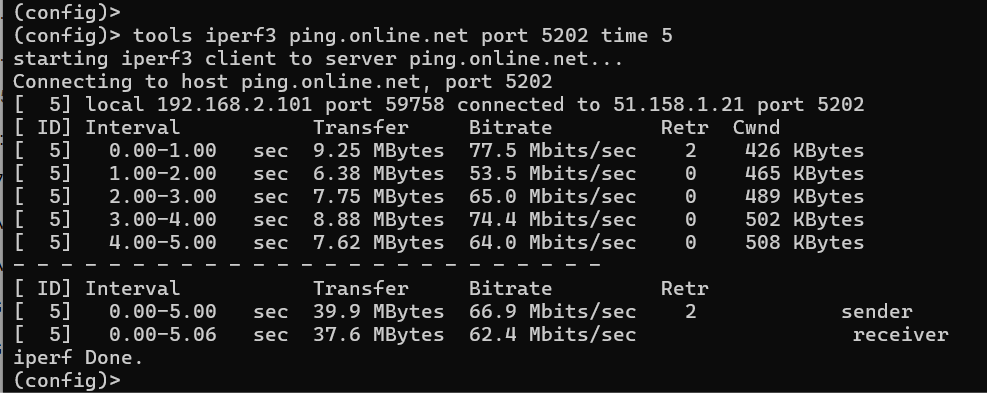
The new iperf3 system component has been implemented, enabling the measurement of bandwidth of a specified network connection via the command line interface (CLI). However, test speeds may be constrained by the performance of specific router models. [NDM-3785]
tools iperf3 {host} [ipv4 | ipv6] [tcp | udp] [port {port}] [bitrate {bitrate}] [time {time} | bytes {bytes}] [source-interface {source-interface}]
Example command:
tools iperf3 ping.online.net port 5202 time 10
Support for the Local Profile Assistant (LPA) and embedded Subscriber Identification Module (eSIM) has been added to the
UsbLteandUsbQmimodem interfaces via the command line (CLI). The eSIM chip can be built into the 5G/4G modem or accessed via an external eSIM adapter. [NDM-3850]show interface {name} esim— get eSIM status (incl. EID),interface {name} esim profile download {qrcode}— download eSIM profiles,interface {name} esim profile list— list eSIM profiles,interface {name} esim profile activate {iccid}— activate eSIM profile,interface {name} esim profile deactivate {iccid}— deactivate eSIM profile,interface {name} esim profile delete {iccid}— delete eSIM profile,interface {name} esim profile rename {iccid} {newname}— rename eSIM profile.
Added an option to support the
nc(Juniper®) protocol in the OpenConnect VPN client, which is selectable via the command line interface (CLI). [NDM-3908]interface {name} openconnect protocol (anyconnect | fortinet | nc)— Enablesnc(Juniper) support for OpenConnect interface{name}.
Implemented the DD-WRT-compatible obfuscation key usage for WireGuard connections via the command line interface (CLI). [NDM-3883]
interface {name} wireguard obfs-key {obfs-key}— Set an obfuscation key{obfs-key}for WireGuard connection{name}.
Implemented support for specifying a domain name (FQDN) in the IKEv2/IPsec VPN Server certificate via the command-line interface (CLI). [NDM-3884]
crypto ipsec profile VirtualIPServerIKE2 identity-local fqdn {fqdn}— Set{fqdn}certificate for use in the IKEv2/IPsec VPN Server.crypto ipsec profile VirtualIPServerIKE2 identity-local fqdn ndns— Set the default KeenDNS certificate in the IKEv2/IPsec VPN Server.
We are broadening our endorsement programme for Internet Operators by introducing support for the TR‑098 data model under the CPE WAN Management Protocol (CWMP). The feature is available on request. Contact our support (support@keenetic.de) for further details. [NDM-3870]
Implemented CLI commands to configure static IPv6 address and port translation rules, enhancing IPv6 NAT management via the command line. See the Command Reference Guide for full syntax. [NDM-3819]
ipv6 static [protocol] ({interface} {mac} | {mac}) [{port} [through {end-port}] ]— defines a translation rule;ipv6 static rule {index} (disable | schedule {schedule})— disables a rule or limits its operation by schedule.
Improved
Improved the DNS Configuration tab on the Internet Safety page to provide a more convenient layout on mobile devices. [NWI-4375]
Added support for specifying IP sub-networks with the
object-group fqdn excludeCLI command. [NDM-4013]Command example:
object-group fqdn TEST exclude ::/0
Added the Average speed information to the Traffic Monitor page. [NWI-4212]
Added the date and time to the filenames of downloaded firmware and startup-config configuration files. [NDM-3999]
Added an option to exclude sub-domain names for Object Groups via the command line interface (CLI). [NDM-4001]
object-group fqdn {name} exclude {address}— exclude the{address}sub-domain from the{name}object group.
The following improvements have been applied to the Web Interface.
Reduced the response time of Wi-Fi toggles on the segment settings pages. [NWI-4363]
Added the Network access setting for IKEv1/IPsec VPN and IKEv2/IPsec VPN servers. [NWI-4328]
Added the data transfer statistics to the Site-To-Site IPsec VPN Connections table. [NWI-4318]
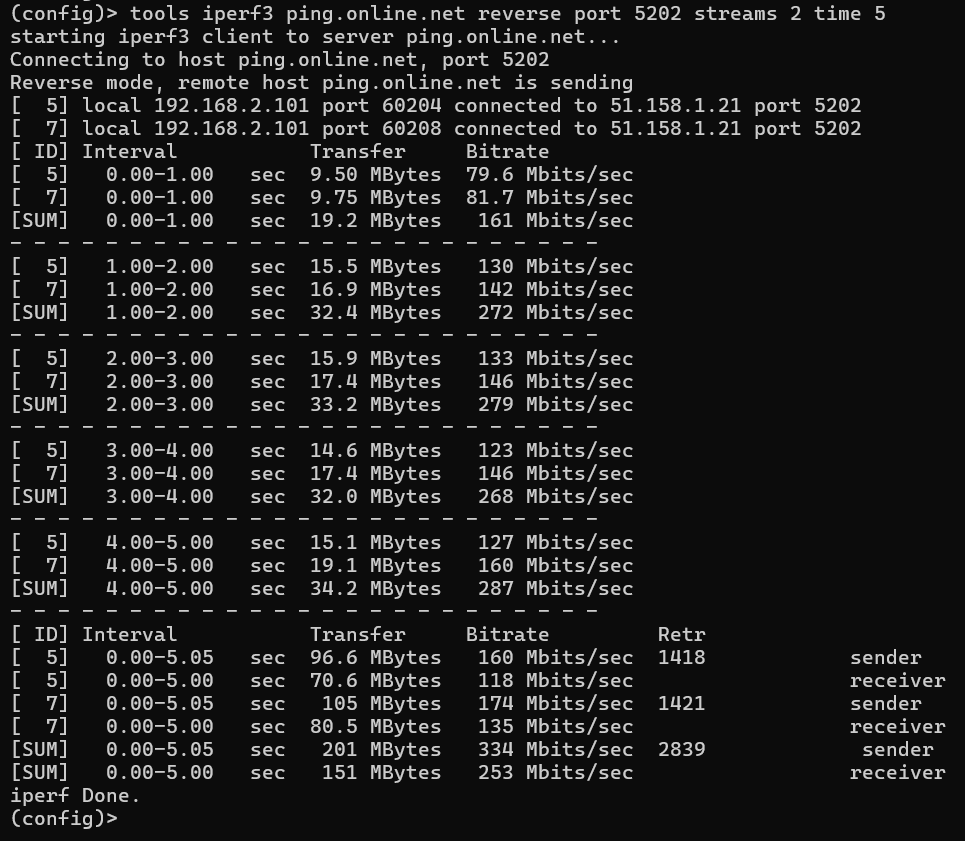
The client part of the iperf3 system component has been extended to support the
reverseandstreamsarguments, enabling download bandwidth testing and the use of parallel network streams. [NDM-3963]tools iperf3 {host} [ipv4 | ipv6] [tcp | udp] [reverse] [port {port}] [bitrate {bitrate}] [streams {streams}] [time {time} | bytes {bytes}] [source-interface {source-interface}];
Example command:
tools iperf3 ping.online.net reverse port 5202 streams 2 time 5.
Moved the
acq,apn, andwwan-force-connectedcommand-line configuration commands from theusbsub-tree to themobilesub-tree; see details below. [NDM-3950]Deprecated
interface {name} usb acq→ currentinterface {name} mobile acq;Deprecated
interface {name} usb apn→ currentinterface {name} mobile apn;Deprecated
interface {name} usb wwan-force-connected→ currentinterface {name} mobile force-connected.
Improved the loading speed of dialogue popups on the Client Lists page when the Knowledge Base article links cannot be obtained or unavailable. [NWI-4326]
An interface selection option has been added when exporting user-defined routes to a
.batfile, enabling customised route export per interface. [NWI-4288]The IPv6 system component was removed, as IPv6 functionality has been integrated into the base OS. [NDM-3935]
Implemented batch removal of User-Defined Routes per interface through the command line (CLI), allowing the destination arguments
{network} {mask} | {host}to be optional. [NDM-3911]no ip route [{network} {mask} | {host} | default] [{gateway} | {interface}] [metric]— Deletes IPv4 routes.no ipv6 route [{prefix} | default] ({interface} [{gateway}] | {gateway})— Deletes IPv6 routes.no ip policy {name} route [{network} {mask} | {host}] [{interface} | {gateway}] [ {metric}]— Deletes IPv4 routes in policy{name}.no ip policy {name} ipv6 route [{prefix} | default] ({interface} [{gateway}] | {gateway})— Deletes IPv6 routes in policy{name}.
Example command:
no ip route ISP— Deletes all IPv4 static routes from theISPinterface.The following improvements have been applied to the Web Interface.
Enabled the use of
VLAN 0for Ethernet cable connections, improving compatibility with certain Internet service providers. [NWI-4315]Added a new Automatic theme option that adapts to the system’s light or dark colour scheme preferences for a seamless user experience. [NWI-4242]
Implemented support for configuring the WireGuard Peer obfuscation key in WireGuard connections via the command line interface (CLI). [NDM-3917]
interface {name} wireguard peer obfs-key {obfs-key}— Set an obfuscation key{obfs-key}for WireGuard Peer connection{name}.
Enabled mDNS announcements for the Web Interface (HTTP) service, making it discoverable in the Home segment. [NDM-3919]
Improved static route import/export by adding support for comments or remarks in Windows® batch files; lines ending with
:: remand& remare now correctly identified as comments and preserved during import/export. [NDM-3889]Routes example:
route add 5.5.5.0 mask 255.255.255.0 0.0.0.0 :: rem route-to-5-networkroute add 4.4.4.4 mask 255.255.255.255 0.0.0.0 & rem route-to-4-net
Fixed
Fixed an issue where the
identity-localparameter was reset when reconfiguring the IPsec VPN Server. [NDM-4036]
Restored the lte-firmware option in the System Files list that was occasionally missing under specific conditions. [NWI-4367]
The OS Kernel has been patched to resolve the following CVE security vulnerabilities:
CVE-2024-36971. [SYS-1436]
CVE-2024-41012. [SYS-1430]
CVE-2024-50302. [SYS-1431]
Fixed an issue where the SSH server was not accessible from the Internet over IPv6 in certain conditions. [NDM-4010]
The following fixes have been applied to the Web Interface.
Fixed the validation in the DNS server URL field when selecting DNS-over-HTTPS server type on the DNS Configuration page. [NWI-4350]
The following fixes have been applied to the Web Interface.
Fixed a number of issues that were occurring when editing user rights and passwords on the user credential popup. [NWI-4131]
Refined the display of the WireGuard connections list on the Other Connections page. [NWI-4337]
Fixed an issue where the OpenConnect client failed to establish a connection with the
system failed [0xcffd0085]error caused by IPv6 DNS usage. [NDM-3962]
The following fixes have been applied to the Web Interface.
Fixed the display of the drop-down list on the Internet Safety page. [NWI-4306]
Fixed an issue where the Save button for a Modify TTL value on the Mobile connection settings page did not appear correctly. [NWI-4322]
Fixed an issue where user-defined static DNS records (
ip host) lost priority over dynamically obtained records after the device restarted. [NDM-3947]Fixed the address resolution issue that occurred during dynamic reconfiguration in OpenConnect, Proxy, and ZeroTier VPN connections when the server address is specified as an URL. [NDM-3951]
Fixed the incorrect behaviour of the DDNS service when using IPv4 and IPv6 addressing simultaneously or relying solely on the IPv6 protocol. [NDM-3952]
Fixed the incorrect saving of the
no system log reductionCLI command to the running configuration. [NDM-3953]Resolved an issue where clients of IKEv1/IPsec VPN and IKEv2/IPsec VPN servers did not receive static routes correctly. [NDM-3954]
Fixed an issue that caused
WifiStationXinterfaces to incorrectly reset their MAC address to the default state. [NDM-3906]
Fixed the forwarding of negative DNS responses from the DNS proxy bound to 127.0.0.1, ensuring that local clients now receive these responses correctly. [SYS-1382]
Fixed an issue in which a
UsbLtemodem connection failed to restart when Ping Check was enabled in certain scenarios. [NDM-3848]